Quick answer
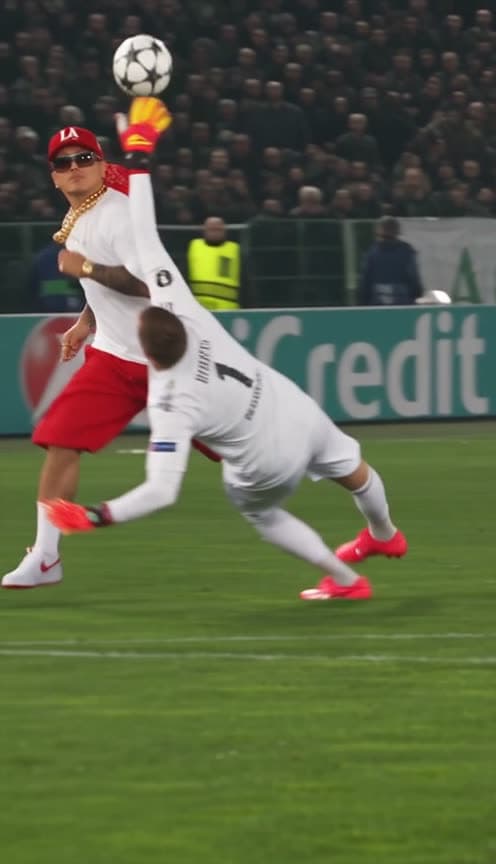
Starrd's Özil Goal template recreates Mesut Özil's chip-the-keeper goal for Arsenal away at Ludogorets in the 2016 Champions League, with you as the scorer. Upload one photo and you play the whole move in the exact clothes from your photo, not a football kit: you dribble at the goalkeeper, chip the ball over him as he dives, chase it down, beat two sliding defenders in green, stop the ball dead and roll it into the empty net while the camera swings to the goal. The keeper stays in white, the defenders in green, under floodlights and UniCredit advertising boards in a packed stadium. The motion comes from the original broadcast footage, so every touch lands on time. The sound is the original TikTok's audio. 15 seconds, vertical 9:16, 480p, 150 credits (about $7.50).
Mesut Özil's chip over the keeper, with you as the scorer, wearing exactly what's in your photo. Lob the diving goalkeeper, skin two sliding defenders and roll it into the empty net under the floodlights. Here it is:
The Özil Goal
Score the famous Champions League chip goal in your own outfit: lob the keeper, beat two defenders, empty net. 15 seconds, vertical.
What You Get
- The whole goal, one take. The same broadcast camera, following you from the first touch to the net.
- One photo. You, or your pet.
- Your own clothes. No kit. Your cap, chains, sneakers, whatever your photo shows, for all 15 seconds.
- The real move. The chip, the chase, two sliding defenders, the stop and the finish, on the original timing.
- A real night match. Floodlights, a packed crowd, stewards in yellow vests, a keeper in white and defenders in green.
- The original sound. The audio the clip went viral with.
- 15 seconds, vertical 9:16.
What the Clip Actually Is
It's Mesut Özil's goal for Arsenal away at Ludogorets in the 2016 Champions League group stage. Through on goal, Özil chips the onrushing keeper, chases the ball down, lets two defenders slide past him, then calmly rolls it into the empty net. It keeps coming back on TikTok; our version is based on a repost by @masod.ozil91 captioned "This goal 💫".
Why it suits AI: the goal is famous for how calm it is. Putting someone in streetwear, cap and chains into that exact move, with real defenders sliding at them, is the joke.
The Beats, Second by Second
| Time | What happens |
|---|---|
| 0:00 | You dribble at goal; the keeper in white rushes out and slides at the ball |
| 2s | You chip it over him as he dives, and he ends up sprawled on the grass |
| 4s | You sprint after the bouncing ball and kill it with one touch |
| 6s | You cut inside; a defender in green slides in and misses, then another goes to ground |
| 10s | You stop the ball dead and shift it onto the other foot |
| 13s | You roll it toward goal, and the camera swings to the ball going into the empty net |
Which photo: a clear, full-body photo. Whatever you're wearing in it is your matchday outfit.
Your Look
- Your face and build come from your photo.
- Your outfit stays on. We tested it with a red LA cap, a red bandana, sunglasses, gold chains, a white tee, red shorts and white sneakers, and every piece stayed put through the sprint and the shot.
- Want a different colour? Ask for it in the Director's Notes; the move and the other players stay the same.
Pick the outfit that makes the contrast funniest. The more it doesn't belong on a Champions League pitch, the better it plays.
The Fastest Way
The Özil Goal
One photo, your own outfit, Özil's chip goal under the floodlights. People and pets.
One photo, 150 credits (about $7.50), no prompt. It renders at 480p, vertical 9:16, with the original sound. Find it in Sports.
Build It Yourself
1. Use the real footage for the motion. Turn the broadcast clip into a depth-map video (Depth Anything V2 works) so a video model copies the camera, the players and the ball without copying anyone's face or kit.
2. Make an opening frame. Take the first frame of the clip, remove the scorer, and put yourself in it, in your own clothes, with the ball at your feet. Add front and back views of yourself so the model knows the whole outfit.
3. Write the beats with times. Give each touch a time range: the chip, the chase, the two slides, the stop, the finish.
A televised night football match, one continuous broadcast take following the player. 0 to 2s: the player from the reference image, in their own clothes, dribbles at goal; the goalkeeper in white rushes out and slides. 2 to 4s: they chip the ball over the diving keeper. 4 to 6s: they sprint after the bouncing ball and control it. 6 to 10s: they cut inside; a defender in green slides in and misses, then another. 10 to 13s: they stop the ball dead and shift it onto the other foot. 13 to 15s: they roll it toward goal and the camera swings to the ball going into the empty net.
4. Render it vertical. Feed the opening frame, your photo and the depth video to a model that takes a reference video (we used Seedance 2.5), at 9:16 and 15 seconds, then lay the original audio over it.
Common Mistakes
Putting yourself in a kit. Models drift toward football kits on a pitch. Say clearly that the player wears their own clothes and everyone else wears kit.
Using the raw footage as the driver. The original player's face and kit leak back in. A depth map carries only the movement.
Losing the hat. Headwear and sunglasses fall off mid-sprint unless you say every item stays on for the whole video.
Score bars and captions. Leave them out; they come back as garbled text.
FAQ
How many photos? One.
Do I wear a kit? No, your own clothes.
People or pets? Both.
How long is it? 15 seconds, vertical 9:16.
What does it cost? 150 credits, about $7.50.
Related Reading
- How to Make a World Cup AI Video: more football, starring you
- How to Make the AI World Cup Fan Cam Video: caught on the stadium big screen
- How to Make the Streetball AI Video: another skills video starring you
- Viral AI Video Trends 2026: every trend we've turned into a template this year