Quick answer
Starrd's Wit The Pinga template recreates the viral TikTok of a man singing Lauryn Hill's "Killing Me Softly" a cappella in a corner store and belting "wit da PINGAAA". Upload one photo, of a person, a pet or a cartoon animal, and they sing it side-on to the camera, in the same place your photo was taken and wearing exactly what your photo shows. The head sway, the chin lift, the wide-open belt, the pause and the eyes-closed rocking all come from the original performance, and the sound is the original singer's voice, so every mouth movement lands on his timing. 15 seconds, vertical 9:16, 480p, 150 credits (about $7.50).
The viral corner-store "Killing Me Softly" singer, with your person or pet in his place: side-on, a cappella, eyes closed, belting "wit da PINGAAA". Here it is:
Wit The Pinga
Your person or pet sings Killing Me Softly like the viral PINGAAA singer, on his exact timing. 15 seconds, vertical.
What You Get
- The whole performance, one take. The same side-on phone close-up as the original.
- One photo. You, a friend, your pet, or a cartoon animal.
- Your own setting. The singer performs where your photo was taken.
- Your own look. Caps, sunglasses, chains, earrings, everything in your photo stays on.
- Lip sync on his timing. The mouth, head sway, chin lift and eyes-closed rocking come from the original take.
- The original voice. The sound the clip went viral with.
- 15 seconds, vertical 9:16.
What the Clip Actually Is
An older man in a red tee stands in a corner store aisle and sings the opening of Lauryn Hill's "Killing Me Softly" (the Fugees version) a cappella, completely lost in it, to someone filming him side-on. He belts one line as "wit da PINGAAA", and that's the meme. Our version is based on the TikTok by @.kjeezy.
Why it suits AI: the joke is the total commitment. Put that soulful, eyes-closed delivery on a raccoon in diamond grills or a monkey in a tuna-can hat and it lands every time.
The Beats, Second by Second
| Time | What happens |
|---|---|
| 0:00 | Eyes half-shut, chin up, swaying slowly into the first line |
| 3s | The belt: mouth wide open, head tilting back on "PINGAAA" |
| 4s | Silence, mouth closed, a look down |
| 5s | Brows pinched, pained and soulful on the next line |
| 8s | One long drawn-out note, lips pushed into an O |
| 11s | Eyes closed, rocking gently through the title line |
| 14s | Starts the line again, softer |
Which photo: a clear chest-up photo, ideally in a fun place. The setting in your photo becomes the stage.
Your Look
- Faces and fur come from your photo.
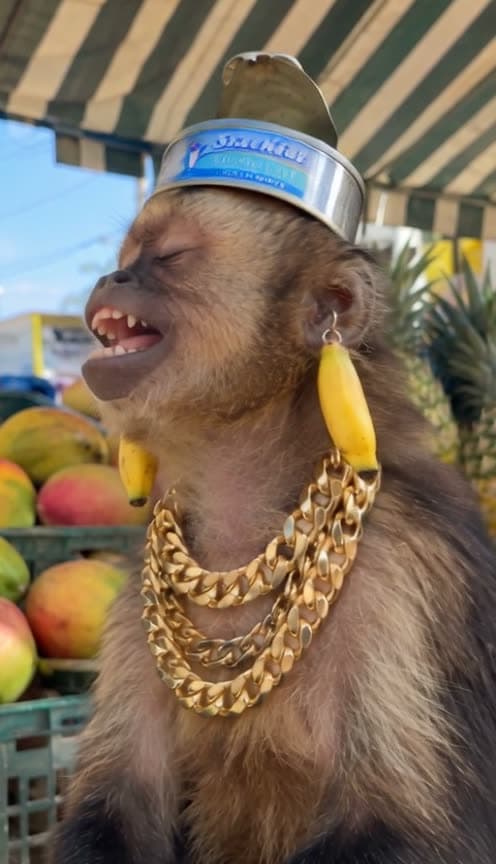
- Accessories stay on. We tested it with a monkey in a tuna-can hat, banana earrings and stacked gold chains, and a raccoon in a sideways cap, diamond sunglasses, a nose ring, dangling earrings and a diamond grill.
- Want something extra? Ask for it in the Director's Notes: a chain, sunglasses, a hat, or a different colour.
Dress your pet up before you shoot the photo, or pick one that already has a look. The more serious the bling, the funnier the soulful delivery.
The Fastest Way
Wit The Pinga
One photo, people or pets, the viral PINGAAA performance with the original voice.
One photo, 150 credits (about $7.50), no prompt. It renders at 480p, vertical 9:16, with the original voice. Find it in Comedy & Viral.
Build It Yourself
1. Use the real take for the performance. Turn the original clip into a depth-map video (Depth Anything V2 works) and keep the singing as its sound. The depth map carries the head, jaw and mouth movement without anyone's face. Remove any burned-in captions first, or they show up in the depth map.
2. Match the angle. Make an opening frame of your singer in the same side-on profile as the original, facing the same way. If the angle doesn't match, the face fights the motion.
3. Write the beats with times. Give the belt, the pause, the long note and the eyes-closed line each a time range.
A candid vertical phone video, one continuous take, a side-on close-up of the singer from the reference image, singing a cappella with deep soul. 0 to 3s: eyes half-shut, chin raised, swaying slowly. 3 to 4s: belts the line, mouth wide open, head tilting back. 4 to 5s: silence, mouth closed, looks down. 5 to 8s: brows pinched, pained. 8 to 10s: one long note, lips pushed forward into an O. 11 to 14s: eyes closed, rocking gently. The mouth opens and closes exactly with the singing in the reference video.
4. Render it silent, then add the voice. Feed the opening frame, your photo and the depth video to a model that takes a reference video (we used Seedance 2.5) with its own audio off, then lay the original voice over it. The mouth and the voice both come from the same take, so they line up.
Common Mistakes
Letting the model sing. Asking the video model to re-sing the song drifts by up to a second and can trip copyright filters. Render silent and add the real voice.
The wrong angle. An opening frame facing the other way from the original fights the motion for the whole clip.
Captions in the driver. Burned-in captions turn into raised text in a depth map and come back as garbled lettering.
Losing the accessories. Say every item stays on for the whole video, or hats and earrings drift off.
FAQ
How many photos? One.
People or pets? Both, plus cartoon animals.
Whose voice is it? The original singer's.
How long is it? 15 seconds, vertical 9:16.
What does it cost? 150 credits, about $7.50.
Related Reading
- How to Make the White Chicks "A Thousand Miles" AI Video: another sing-along meme starring you
- How to Make an AI DJ Video: more music and performance templates
- How to Make the "If You Grab Me, Imma Bite You" Pet Video: your pet, talking
- Viral AI Video Trends 2026: every trend we've turned into a template this year