Quick answer
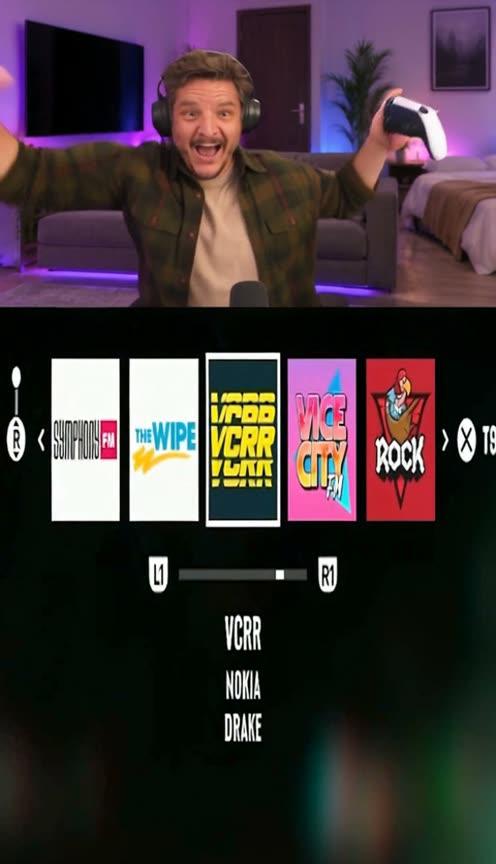
Starrd's GTA 6 Drake Radio Reaction template recreates the viral split-screen streamer clip with one photo. You're on the webcam in the top part, in a black gaming headset over your own outfit, and the bottom part is the gameplay: a pickup truck driving at night while the in-game radio wheel lands on 'VCRR · Nokia · Drake'. You can't believe there's a Drake radio, throw both arms up with the controller and yell, lean in shouting 'no way', sing along with your eyes half shut, and end grinning 'best game ever'. Mouths are timed to the original audio, and it works with dogs and cats too. 1 photo, 24 seconds, vertical 9:16, Seedance 2.5, 250 credits (about $12.50). Contains explicit language.
The streamer clip from GTA 6 launch week, with you (or your pet) on the webcam.
The radio lands on Drake, and nobody can stay calm:
GTA 6 Drake Radio Reaction
1 photo. You're the streamer losing it when the GTA 6 radio lands on Drake's Nokia. 24 seconds, people or pets.
What You Get
- The whole split-screen clip, 24 seconds: your webcam on top, the gameplay below.
- You as the streamer, in your own outfit with a black gaming headset.
- The radio wheel landing on Drake, and the night drive in the pickup truck, as in the original.
- Mouths timed to the reaction, with the original, uncensored audio.
- People or pets: dogs and cats sit at the desk with the controller in their paws.
- Vertical 9:16, ready for TikTok, Reels and Shorts.
What the Video Actually Is
On November 18, 2026, one day before GTA 6 came out, the streamer Lacy posted a split-screen clip from his stream to TikTok, captioned "Drake is in GTA VI!", and it passed 699,000 plays and 76,000 likes within hours. The top half is his webcam in an LED-lit living room; the bottom half is the game. He flicks through the radio wheel, it lands on a station called VCRR playing Drake's "Nokia", and his reaction goes from "there's a Drake radio?" to arms in the air, controller flying, to singing along with his eyes shut.
Why it suits AI: it's launch week, and everyone wants to be the one on the stream when the game surprises them. The template keeps the gameplay and every beat of the reaction and puts your face on the webcam.
The 24 Seconds, Beat by Beat
| Time | What happens |
|---|---|
| 0–1.6s | Leaning in, eyes on the game, muttering |
| 1.6–4.1s | The radio wheel opens. "There's a Drake radio?" Disbelief, then a stare |
| 4.1–8s | Nokia kicks in: both arms up, controller in hand, yelling with joy |
| 8–11s | Leaning in to the camera: "No way, oh my god" |
| 11–16.3s | Back to the drive. Singing along, eyes half shut, pointing at the camera |
| 16.3–21s | A big shrug with both arms, then nodding to the song, grinning |
| 21–24s | "Best game ever, there's a Drake radio" |
Your Look
You keep your own face, hair and outfit, with a black over-ear gaming headset added. Glasses stay on if they're in your photo. The room is the streamer's: a grey sofa with a purple LED glow, a wall TV and plants behind you. Pets stay real animals, sitting upright in the headset with their own fur and paws.
The webcam frames you from the chest up, so a clear front-facing photo with your face well lit works best. Your top shows the most, so wear the one you want on stream.
The Fastest Way
GTA 6 Drake Radio Reaction
The viral GTA 6 streamer reaction with one photo, people or pets. 24 seconds.
One photo, 250 credits (about $12.50), no prompt. Vertical 9:16, 24 seconds, with sound. Find it in GTA & Games.
Build It Yourself
1. Split the driving video in two. Turn only the webcam half into a depth map, so the model copies the streamer's movement but not his face, hair or hoodie. Leave the gameplay half as the real colour footage, so the radio wheel and the drive come through.
2. Clean the caption out first. The original's caption sits across the split line. Inpaint it out of every frame before making the depth map, or its letters show up as raised shapes.
3. Smooth the headset. Turn the original headset into a plain dome in the depth map, then add the headset back in the prompt, so every subject gets one that fits their head.
@Image1 is a character reference sheet. @Video1 is the reference video of the same split-screen livestream clip with its sound. Its TOP PART is a greyscale depth map of THE STREAMER's webcam that carries only shapes, movement and timing. Its BOTTOM PART is the real game footage in full colour.THE GAME comes from the bottom part of @Video1 and nowhere else, frame for frame: the same night streets, the same pickup truck, the same radio wheel and station tiles, the same chat column.[00:04.10-00:08.00] the song kicks in: THE STREAMER throws both arms up, a white game controller in one hand, and yells with joy.
[00:11.00-00:16.27] THE STREAMER sings along, eyes half closed, head nodding on the beat.MOUTH: talks, yells or sings only during 00:01.60-00:03.17, 00:04.10-00:16.27 and 00:16.70-00:18.07; closed and still during 00:18.07-00:20.90.Avoid: a grey depth-map look in the top part, game footage that differs from @Video1, a black hoodie that is not in the photo, cuts in the webcam, losing the split screen.
Common Mistakes
Turning the whole frame into depth. A depth map of the gameplay loses the radio wheel's station tiles and text. Keep the bottom half in colour.
Leaving the caption in. Burned-in text across the split line gets copied into the render, or embossed into the depth. Remove it first.
The original's hoodie on everyone. Name the black hooded sweatshirt and the crew cut as not the subject's, or renders drift towards them.
A moving split line. Tell the model the line sits at exactly the same height in every frame, or it can creep down mid-clip.
Related Reading
- How to Make the GTA 6 Extended Look Trailer AI Video: the one-take elevator-to-rooftop opening, with up to four photos
- How to Make the GTA 6 Coffee Run AI Video: PS2 graphics, a five-star chase, then next-gen
- How to Make the 'Waiting On My Fries' Meme AI Video: this week's two-photo taco-shop skit
- Viral AI Video Trends 2026: every trend we've turned into a template this year