Quick answer
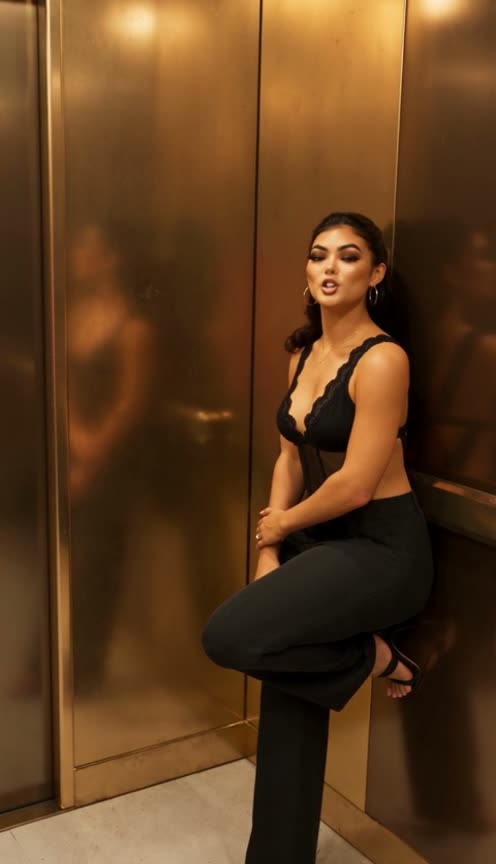
Starrd's GTA 6 Trailer (Extended Look) template recreates the one-take elevator-to-rooftop scene from Rockstar's GTA VI Extended Look trailer with your own photos, rendered as in-engine video game characters. Photo 1 leans in a bronze elevator and says "Just be charming, okay? ... And don't worry about Brian.", photo 2 is followed out onto a sunny rooftop bar and takes your hand, and photos 3 and 4 are the older couple at the bar who light up: "Oh, my God, as I live and breathe" ... "look at the two of you!" Everyone keeps their own face and outfit, mouths are timed to the original voices, and any empty slot gets an AI stranger. Up to 4 photos (1 required), 30 seconds, vertical 9:16, Seedance 2.5, 250 credits (about $12.50).
One of our GTA 6 AI video templates for launch week, made from up to four photos.
The Extended Look's elevator-to-rooftop opening, in one take, with you and your people as the characters:
GTA 6 Trailer (Extended Look)
Up to 4 photos. Out of the elevator, across the rooftop bar, and the warmest welcome from the old friends at the bar. 30 seconds.
What You Get
- One continuous 30-second take, the same camera path as the trailer: elevator, lobby, rooftop, bar.
- Up to four people: you, your partner and the older couple, each in their own outfit.
- Next-gen video game rendering: smooth game-model skin, glossy CG hair, ray-traced reflections on the bronze elevator and the bar, and a warm halation glow in the Florida sun.
- The trailer's own audio, with each line timed to the right mouth.
- AI strangers for empty slots, so it works with a single photo.
- Vertical 9:16, ready for TikTok, Reels and Shorts.
What the Video Actually Is
On August 29, 2026, Rockstar Games posted "Grand Theft Auto VI: An Extended Look". The vertical TikTok cut passed 2.9 million plays, 190,000 likes and 13,500 saves, and it opens on a single unbroken shot: a woman in a pink dress leans in an elevator, the camera swings to her partner and follows him out through a lobby with a living plant wall, the sun floods in on a rooftop bar, they take each other's hand, and an older couple at the bar light up when they see them.
The template keeps that take and its timing and swaps in your photos. GTA 6 itself comes out on Thursday, November 19, 2026, on PS5 and Xbox Series X|S. This is a fan-made template, not affiliated with Rockstar Games.
Why it suits AI: a 30-second one-take with four actors, a moving camera, mirror-like reflections and dialogue is a big production to stage for real. Here it takes your photos.
The 30 Seconds, Beat by Beat
| Time | What happens |
|---|---|
| 0–4.5s | Photo 1 leans on the bronze elevator wall, one foot up: "Just be charming, okay?" ... "And don't worry about Brian." |
| 4.5–10s | The camera pans to photo 2 and follows them out of the elevator, through a lobby with a living green wall and down a corridor |
| 10–13.5s | A glass door opens onto the rooftop and the sun blooms in; photo 1 steps in beside photo 2 and takes their hand |
| 13.5–24s | Hand in hand across the sunny terrace toward the bar, seen from behind |
| 23–28s | Photo 4, on a bar stool: "Oh, my God, as I live and breathe," photo 3, standing: "look at the two of you!" |
| 28–30s | Photo 2, just off screen: "Hey, Lori, it's good to see you, Brian." The older couple beam at them |
Your Look
Everyone keeps their own face, hair and outfit, rebuilt as a next-gen game character. Glasses and sunglasses stay on if they're in your photo. If only the top half of you is in the picture, the template completes the outfit with plain matching pieces, so the long walk across the rooftop looks right.
Photo 1 gets the only real close-up, in the elevator, so use your sharpest front-facing photo there. The older couple's faces are small in a wide shot, so any clear photo works for photos 3 and 4.
The Fastest Way
GTA 6 Trailer (Extended Look)
Recreate the GTA 6 Extended Look's elevator-to-rooftop opening with your own photos. 1 to 4 photos, 30 seconds.
Up to four photos, 250 credits (about $12.50), no prompt. Vertical 9:16, 30 seconds, with sound. Find it in Retro & Gaming.
Build It Yourself
1. Drive the motion with a depth map, not the raw clip. A depth map of the trailer carries the camera path, the walk and the hand-holding, without the original characters' faces or clothes. It also lets you paint out on-screen overlays like the rating badge.
2. Make a character sheet in the target style. The video model copies the look of its reference image much more than the words in the prompt. If the sheet looks like photos, the video does too, so the game-render look has to be in the image prompt first. (Why a sheet: Character Sheet vs Storyboard Grid.)
3. Time every mouth. Work out who says each line from the audio and the original mouths, then give each person their own open and closed windows, and keep off-screen voices out of the audio that drives the motion.
@Image1 is a character reference sheet. @Video1 is a greyscale depth map of one continuous 30-second take with the voices; it carries only shapes, movement, the camera and the timing.THE LOOK, in every frame: an in-engine video game cutscene from a next-generation open-world crime game set in sunny Florida. Everyone is a CG game model, never a filmed human: smooth game skin with a satin sheen, glossy CG hair, ray-traced reflections on the bronze elevator, the glass doors and the bar, warm halation glow and bloom.[00:00-00:04.50] PERSON 1 leans on the bronze elevator wall, one knee bent, cool and amused.
[00:05.20-00:09.80] PERSON 2 walks out through a lobby with a living plant wall; the camera follows.
[00:11.80-00:24.00] PERSON 1 takes PERSON 2's hand; they walk across the sunny rooftop toward the bar.MOUTHS: PERSON 1 speaks only during 00:00-00:01.96 and 00:03.54-00:05.00. PERSON 4 speaks only during 00:23.14-00:26.68. PERSON 3 speaks only during 00:26.78-00:28.08, then grins with lips closed. A voice from off screen never moves anyone's mouth.Avoid: live-action footage, real-human skin texture, a box or patch on the elevator wall, an outfit that changes, extra people near the camera, text, logos, game HUD, rating icons.
Common Mistakes
A photoreal reference image. Strong "video game" wording in the video prompt isn't enough. Put the game-render look in the image prompt and the video follows.
Painting out an overlay with a flat fill. A flat patch in a depth map reads as a solid object, and the model draws a panel on the wall. Fill along the wall's own lines instead.
Giving every line to the person on screen. Two lines in the last three seconds come from someone off screen. If that voice is left in the driving audio, the people on screen mouth it.
Cutting the clip mid-line. "Hey, Lori, it's good to see you, Brian." ends at 29.92 seconds. A 30-second window keeps all of it and stops before the next line.
Related Reading
- GTA 6 AI Video: Every Template: the hub for every GTA 6 template, including the 15-second story trailer
- Recreate the GTA 6 Trailer With AI: more ways to put yourself in the trailers
- How to Make the GTA 6 Farewell AI Video: goodbye to the old crew and a sky switch into neon Florida
- How to Make the GTA 6 Bonnie and Clyde AI Video: a couple's first job with a new crew
- How to Make the GTA 6 Vice City Arrival AI Video: arriving by speedboat, ending on a character-intro freeze-frame
- How to Make the GTA 6 Legends Send-Off AI Video: every era of the series sends you off
- How to Make the GTA 6 Heist Crew Interview AI Video: hire a crew like HR, PS2 graphics to next-gen
- Viral AI Video Trends 2026: every trend we've turned into a template this year