Quick answer
To make the AI dog handshake video, turn one photo of your pet into a standing, bipedal version and map it onto the walk-up-and-shake motion with a motion-control model. It's the greeting cousin of the talking-dawg family. Starrd's The Handshake template does it in one tap.
What You're Trying to Make
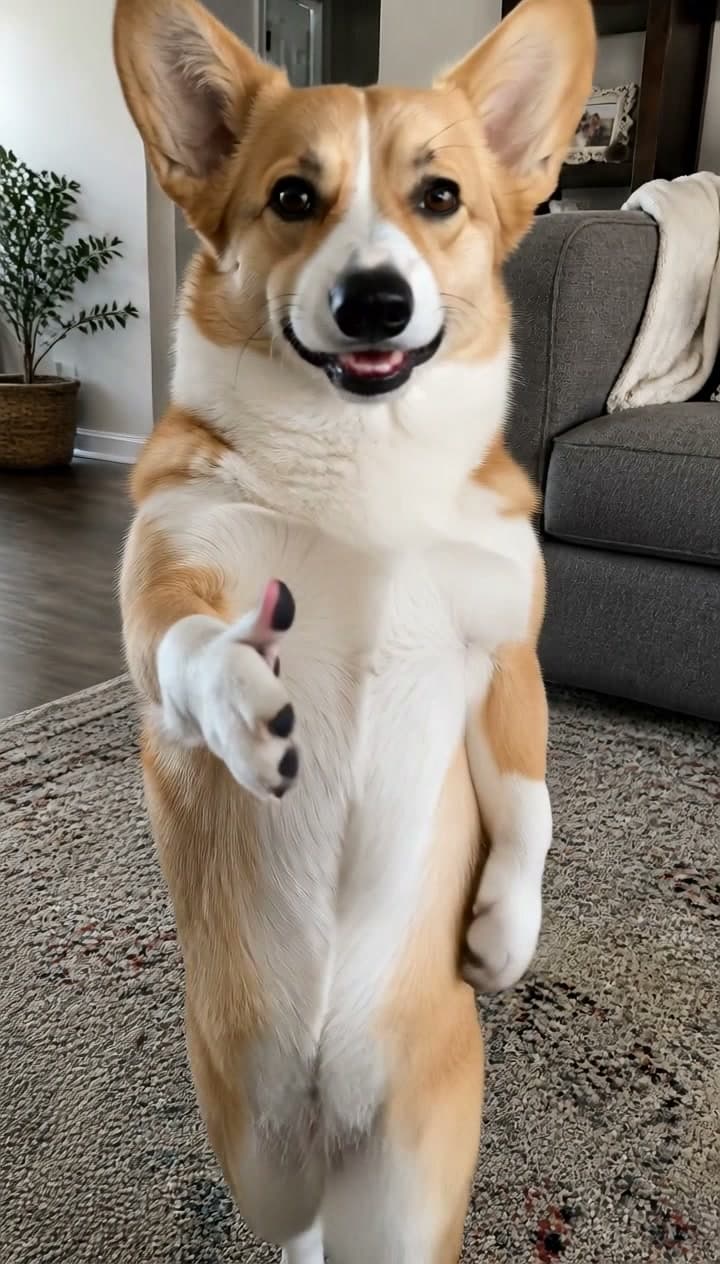
A dog walks toward the camera — upright, on its hind legs, arms swinging like a person crossing a room. It reaches you, extends a front paw for a handshake, then leans in close and starts talking straight down the lens. Deadpan. Like it has business to discuss.
That's the dog handshake clip, and it started showing up everywhere in early August 2026. This guide walks through how to make one with your own pet instead of the stock dog: what photo to use, the motion-control method that makes the walk-and-shake work, which model handles it, and how to post it.
Prompt used
One photo in, the upright walk-up and the offered paw out. No editing, no prompt writing.
Fastest way — the The Handshake template does the whole thing from one photo of your pet: it stands them upright, runs the motion pass, and hands you a vertical clip in a couple of minutes — no prompt, no CapCut timeline. Rather build it by hand? The full method's below. ↓
Where the Trend Came From
The clip that kicked it off was published on 3 August 2026 as a downloadable green-screen asset — an AI-generated golden retriever, keyed on a flat green background, walking up and offering a paw. It was tagged as a CapCut template from the start, which tells you what it was built for: creators key out the green, drop the dog into their own footage, and cut it so the dog appears to walk up and shake their hand.
It moved fast for a template asset. Within two days the source post had racked up roughly 20,000 views and — more tellingly — nearly 200 reposts against 500 likes. That share-to-like ratio is the signal worth paying attention to. People weren't just enjoying it; they were saving it to use. That's what a format looks like before it peaks, as opposed to a one-off video that's already done its numbers.
It also isn't arriving from nowhere. The handshake clip lands in the middle of a well-established family:
- The talking-pet AI videos — upright dogs delivering monologues, like "if you grab me, imma bite you" and the don't-call-me-back phone rant.
- The dogs-with-human-hands edits, where pets get hands and gestures grafted on for a voiceover bit.
- The long-running handshake meme green-screen templates, which the dog version is a direct riff on.
What's new is the beat. The rant clips are confrontational — the pet yells at you. The handshake clip is polite, which is somehow funnier: your dog approaches you like a colleague at a conference.
The Fastest Way — Use "The Handshake" Template on Starrd
The The Handshake template packages the whole effect into a single upload. You don't touch a timeline, you don't write a prompt, you don't hunt down the source clip.
- Pick a clear photo. One pet, facing the camera or three-quarter, face and body visible, decent lighting.
- Open The Handshake template in the Starrd app or web library.
- Upload the photo and tap generate. The template first stands your pet upright on its hind legs with its front paws free, then maps that onto the walk-up-and-shake motion — keeping your photo's own room as the background — so your dog struts toward the camera, offers a paw, and leans in to talk.
100 credits, a couple of minutes. The output is a vertical clip ready for TikTok and Reels.
The Handshake
Upload one photo of your pet, get the upright walk-up and the offered paw. A couple of minutes, no editing.
The rest of this guide is for people who want to understand the method or roll their own.
Why This Is Motion Control, Not a Text Prompt
Most AI video guides tell you to write a detailed prompt. This one doesn't work that way.
The movement — the bipedal walk cycle, the arm swing, the paw extending at exactly the right moment, the lean into the lens — all comes from a driving video. You're not describing motion, you're transferring it. No prompt gets you a convincing dog walk cycle; the walk has to be copied.
A motion-control model takes two inputs:
- A driving video — the handshake clip, whose movement gets copied.
- A character image — your pet, whose identity gets mapped onto that movement.
The timing and choreography come from the video. Only the character changes. That's why every version hits the same beats at the same moments.
Or, Build It Yourself — What You Need
- A clear photo of your pet. One animal, face and body visible.
- The driving clip — the handshake video to copy motion from.
- Access to a motion-control model — Kling Motion Control is the one behind the clean versions.
You don't need a video editor or a CapCut timeline, but you do need a model that supports motion transfer with a reference image.
Step 1 — Pick Your Photo
The photo determines the character that ends up walking and shaking. Choosing well saves you wasted generations.
Use:
- A clear, well-lit photo of one pet
- Front-facing or three-quarter angle
- Face and body both visible
- Natural lighting, no heavy filters
Avoid:
- Multiple pets in frame (the model gets confused about which to map)
- Blurry or motion-streaked shots
- Photos where the face is turned away or hidden
- Heavy filters or AI-generated reference images
Step 2 — Stand Your Pet Up First
This is the step most people skip, and it's why most DIY attempts look melted.
The driving video is a bipedal walk — upright torso, two arms swinging, weight alternating between two legs. Feed a photo of a dog standing on all fours into that motion and the model has to stretch a four-legged body onto a two-legged walk cycle. It warps, and it warps worst exactly when the dog is closest to camera.
The fix: convert your pet to a standing, bipedal version first. Use an image model to generate the same pet — same breed, same markings, same face — reared up on its hind legs, front paws raised and clearly separated from the body, full body visible head to feet. Keep the original background and lighting; only the pose changes.
Two details matter more than they look:
- Separate the front paws from the torso. If the paws are tucked in against the chest, the model can't find them, and the handshake beat comes out as a stump. Raised and apart, at roughly chest height, reads cleanly.
- Keep the whole body in frame — head to feet, with a little margin above and below. A cropped foot means an invented foot.
This is the single biggest quality difference in the whole process. Motion-control models estimate a skeleton from your character image — if that image doesn't show a clean, upright, unobstructed silhouette, there's no skeleton to map and the job either warps or fails outright.
That standing image becomes the character you feed into motion control.
Step 3 — Run the Motion Pass
Feed two things into the motion-control model:
- Character image: your standing pet from Step 2
- Driving video: the handshake clip
Settings that matter:
- Character orientation: follow the video. Your pet takes on the driving clip's posture and timing.
- Resolution: 720p is plenty for a vertical social clip, and it keeps the cost down.
- Aspect: vertical 9:16. The trend lives in portrait.
A pet standing upright on its hind legs strides confidently toward the camera, reaches out one front paw to offer a handshake, then leans in close and talks directly to the camera like an old friend. Warm, charming, confident, expressive, animated.
Keep the reinforcement text light — a sentence or two on energy and posture. The motion does the heavy lifting. Describing the timing in words does nothing, because the timing already comes from the video.
Step 4 — Pick a Model
Motion transfer is a specialized feature, so model choice is narrower than text-to-video:
- Kling 2.6 Motion Control — the cheaper tier, and it keeps the driving clip's framing and audio. Its content filter is stricter, though: a reared-up animal with an exposed underside can trip it. Fluffier or longer-coated breeds sail through where short-haired ones sometimes don't.
- Kling 3.0 Motion Control — stronger identity stability across complex motion and more lenient moderation, but it collapses failures into a generic error, so it's harder to debug when something does go wrong.
A green-screen driving clip is fine, by the way — you don't need to key it out first. The background of your finished video comes from your pet's photo, not the green.
Step 5 — Generate and Iterate
Common failures and fixes:
The dog looks melted or four-legged. You skipped the standing step. Generate a clean upright version first, then run motion control on that.
The paw never really extends. The front paws were tucked against the torso in your character image. Regenerate it with the paws raised and clearly separated.
The face drifts from your pet. Use a clearer reference photo with the face fully visible, or regenerate the standing image until the identity is locked before the motion pass.
The job gets refused as sensitive. A reared-up animal showing its belly can trip the content filter. A fluffier breed, or one wearing a shirt, usually clears it.
The walk feels stiff. Usually the character image fighting the pose — a more neutral, front-facing standing image maps more cleanly than an extreme one.
Budget a couple of generations before a keeper. If you're many deep, the problem is almost always the input photo or a skipped standing step, not the model.
Step 6 — Post It
Caption framing. Lean into the formality. Your pet approaching you like a business contact — "he wants to discuss the treat budget," "my dog scheduled a meeting" — matches the deadpan energy of the clip better than a hype caption.
Keep it vertical. The format lives on TikTok and Reels in 9:16.
Label it AI. This format is obviously generated, and platforms require disclosure. The joke survives the label fine.
Don't over-edit. No heavy text overlays or extra effects. The clean version — pet, room, motion, original audio — is the version that travels.
Common Mistakes That Tank Your Video
- Skipping the standing step. The number one cause of melted-looking results.
- Tucked-in front paws. Kills the handshake, which is the entire point of the clip.
- Cropping the feet or the top of the head. The model invents whatever you cut off.
- Multiple pets in the reference photo. Pick one clear subject.
- A hidden or turned-away face. Identity won't lock and the result looks generic.
- Over-editing the post. Extra effects break the simple, recognizable format.
Window of Opportunity
Like every template-driven trend, this one has a shelf life — weeks, not months, before saturation. The share-to-like ratio on the source clip says it's still on the way up rather than on the way down, which is the part of the curve worth posting into.
If a walking, hand-shaking version of your own pet is the goal and the steps above sound like a chore, the template at the top of this guide is the same workflow in one tap.
The Handshake
One photo in, the upright walk-up and the offered paw out. No editing, no prompt writing.
Related Reading
- How to Make the 'If You Grab Me, I'm Gonna Bite You' AI Pet Video — the rant that started the talking-pet family
- How to Make the 'If I Don't Answer the First Time' AI Video — the phone-etiquette tirade, same standing-plus-motion method
- How to Make Your Pet Dance with AI — the other big motion-control pet format
- Viral AI Video Trends (2026): The Monthly Roundup — where the handshake sits among everything else worth making
- Seedance vs Kling vs Veo — which video model to pick and why