Quick answer
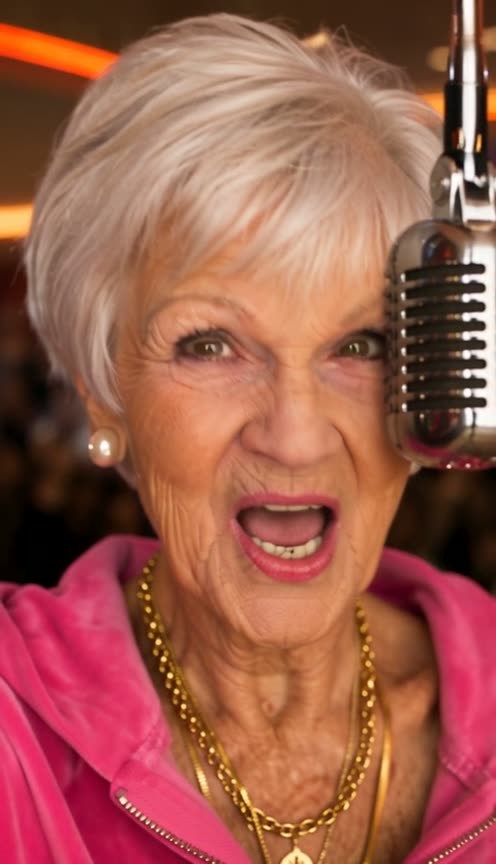
Starrd's Give It All template turns one photo into BigXthaPlug's "Give It All" From The Block performance, with you as the rapper. You rap his opening verse at a hanging vintage chrome mic inside a packed movie theater lobby, under orange LED showtime boards and the Cinemark XD and Luxury Loungers signs, across six shots that cut exactly where the original cuts: wide lobby shots, side angles and a close-up. Every line is lip-synced to the original, uncensored audio, and you keep your own face, hair and outfit. It works with pets too. 1 photo, 20 seconds, vertical 9:16, 480p, Seedance 2.5, 200 credits (about $10). Contains explicit language.
A packed movie theater lobby, a vintage mic hanging on a cable, and you rapping BigXthaPlug's "Give It All" verse into it:
Give It All
One photo. Rap BigXthaPlug's opening verse at a hanging vintage mic in a packed movie theater lobby, lip-synced, in your own outfit. 20 seconds.
What You Get
- 20 seconds of the performance: his whole opening verse.
- Six shots, every cut where the original cuts: the straight-on medium, side angles, the wide lobby shot and a close-up.
- Every line lip-synced to the original audio, from the first frame to the last.
- The movie theater lobby: orange LED showtime boards, red neon, the Cinemark XD and Luxury Loungers signs and a packed crowd behind you.
- The hanging vintage chrome mic at mouth height.
- Your own face, hair and outfit in every shot.
- People or pets.
- Vertical 9:16, with the original, uncensored audio, ready for TikTok, Reels and Shorts.
What the Video Actually Is
It's BigXthaPlug's "Give It All" From The Block performance, posted on the 4 Shooters Only YouTube channel on November 3, 2026. It passed 920,000 views in ten days. The song is from his album Better Over Time.
From The Block usually films artists in their own neighbourhood. This one was shot inside a busy movie theater lobby: BigXthaPlug in a backwards grey cap, an open denim jacket and a heavy chain, rapping at a vintage chrome mic that hangs from the ceiling on a cable, a hype man beside him and the crowd packed in close. The camera cuts fast between wide lobby shots, side angles and close-ups.
Our template uses 0:13 to 0:33, his opening verse.
Why it suits AI: the whole look is the place. Nobody can book a cinema lobby, a hanging mic and a crowd. One photo covers all of it, and the cuts and the lip-sync come from the original.
The 20 Seconds, Shot by Shot
| Time | Shot | What you see |
|---|---|---|
| 0.0s | Straight-on medium-wide | You rap at the hanging mic, orange showtime boards overhead, the hype man beside you |
| 2.3s | Side angle | You turn to the left of the frame, red neon coves behind you |
| 7.8s | The lobby wide | The Cinemark XD and Luxury Loungers signs, the showtime boards and the whole crowd |
| 12.4s | Close-up | Your face up close, the mic at the right of the frame |
| 14.3s | Side angle | Turned to the left again, one arm swinging on the beat |
| 16.4s | Straight-on medium-wide | Back to the front, arms crossed in an X under the showtime boards |
The track runs at 130 BPM, and the cuts land on the beat.
Your Look
You rap in exactly what you wear in your photo, with your own face, hair, glasses and jewellery. Nothing from his outfit is copied onto you: the cap, the denim jacket and the chain stay his. The demo is a silver-haired grandma in a pink velour tracksuit and gold chains, and she fits right in.
Pick a photo where your face is clear and well lit. Shot 4 is a close-up at the mic, and that's where people look hardest.
The Fastest Way
Give It All
You rapping BigXthaPlug's verse in the movie theater lobby. One photo, 20 seconds, lip-synced, cut on the beat.
One photo, 200 credits (about $10), no prompt. It renders on Seedance 2.5 at 480p, vertical 9:16, 20 seconds, with the original audio. Find it in Music.
Build It Yourself
1. Find the window and the cuts. Take 0:13 to 0:33 of the performance and mark the five cuts (2.3, 7.8, 12.4, 14.3 and 16.4 seconds). Fast cuts in one room fool scene detection, so check the frame-to-frame difference for spikes.
2. Crop each shot to 9:16. The original is horizontal. Pick one fixed crop per shot that keeps the rapper and the mic, and don't invent camera moves.
3. Turn the clip into a depth map. A depth video carries the motion and the framing without his face or clothes, so your rapper doesn't inherit them.
4. Make one storyboard sheet of the six setups. Generate all six from your photo in the same lobby, so the signs and the boards stay put.
A wide shot of the person from reference image 1 rapping at a vintage chrome microphone that hangs on a cable at mouth height, inside a packed movie theater lobby at night: orange LED showtime boards overhead, a Cinemark XD sign and a Luxury Loungers sign on the wall behind, red neon light, a crowd pressed in close on every side. They wear exactly the clothes from their photo, mouth open mid-word. Live concert lighting, a touch of grain. No added text.
5. Drive it with the depth map and the song. Put the verse inside the depth video so the model hears what to lip-sync, feed it the sheet and your photo with a timed shot list, and render with a model that copies motion from a reference video (we recommend Seedance 2.5). Lay the full track back on at the end.
Common Mistakes
Letting the mouth stop. The verse runs without a breath gap. Say the rapper raps from the first frame to the last, or the model closes the mouth between lines.
Losing the cinema. Without the showtime boards and the signs in the prompt, the room turns into a generic dark club. Name them.
Copying his outfit. Driving with the raw video brings the cap, the denim jacket and the chain along. Use the depth map and say the clothes come from your photo.
Cropping in the channel logo. The From The Block bug sits in the bottom-left of the original. Keep every crop clear of it.
FAQ
How many photos? One.
How long is it? 20 seconds, vertical 9:16.
What does it cost? 200 credits, about $10.
Is it explicit? Yes, the original audio is uncensored.
Does it work with pets? Yes, people or pets.
Related Reading
- How to Make the 'They Say I'm 2 Much' AI Rap Video: rap ATM Danny's donut shop verse, lip-synced, from one photo
- How to Make the '58th Floor' AI Video: Anderson .Paak and Cordae's COLORS session, lip-synced with a friend
- How to Make the 'Gangsta's Paradise' AI Choir Video: rap Coolio's verse in a cathedral with a choir behind you
- How to Make the Outstanding Tiny Desk AI Video: a live desk-concert performance, starring you
- How to Put Yourself in Any Video With AI: character swap on your own clip
- Viral AI Video Trends 2026: every trend we've turned into a template this year