Quick answer
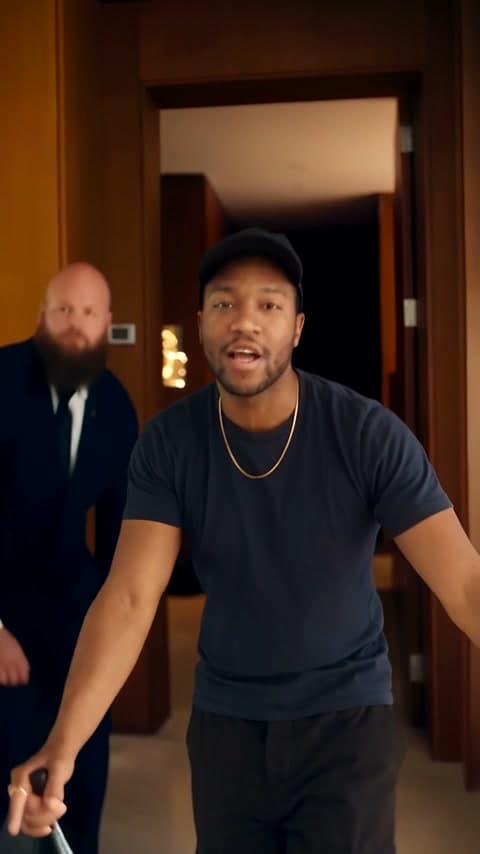
Upload one photo to Starrd's Popstar template and it makes a 12-second vertical music-video clip of you as the star of DJ Khaled and Drake's 'Popstar': you walk the warm wood-panelled hallways of a mansion with a champagne bottle in your right hand, lip-syncing the verse straight to the camera, arms swinging wide, a bald, bearded bodyguard in a dark suit following you, and the shot ends out on a glass balcony. Your face, your own top, cap, glasses and jewellery, in baggy black cargo pants, with the song playing over it. 100 credits (about $5).
One photo in, and out comes you as the star of DJ Khaled and Drake's 'Popstar' video: champagne bottle in hand, lip-syncing through the mansion with security on your shoulder. Here's one made from a single selfie:
Popstar
One photo. You lip-syncing DJ Khaled and Drake's 'Popstar' through a mansion, champagne in hand. 12 seconds, vertical.
What You Get
- The mansion. Warm wood-panelled hallways, lit wall niches and doorways, ending out on a glass balcony.
- The performance. Every step toward the lens, every time the arms swing wide, every point of the champagne bottle, on the same beats as the original.
- The mouth. It copies the original lip sync frame by frame.
- Security. A bald, bearded bodyguard in a dark suit shadows you through the house.
- Your look. Your own face, top, cap, glasses and jewellery, in baggy black cargo pants.
- 12 seconds, vertical 9:16, one handheld take with the song, ready for TikTok, Reels and Shorts.
What the Trend Actually Is
The 'Popstar' video is a fantasy of the pop-star lifestyle: wake up in a mansion, champagne in every hand, a security guard who never leaves your side. In the original, Justin Bieber lip-syncs Drake's lines and lives that fantasy for the whole video.
Why it works: it's pure swagger, and swagger is funniest on someone who's never had a bodyguard in their life. Put your face on the pop star and the whole video becomes a flex.
Use one clear, well-lit photo with your face sharp and facing the camera. The mansion, the bodyguard, the bottle and the performance come from the template; your photo only decides who the star is.
The Fastest Way
Popstar
One photo, the full 12-second mansion lip sync with the song. Champagne and security included.
One photo, 100 credits (about $5), no prompt. It renders on Seedance 2.5 at 480p, vertical 9:16.
Build It Yourself
1. Swap yourself into a real frame of the clip. Take a clean frame from the performance you want to copy and ask an image model to recreate it with one change: the performer replaced by you. Keeping the real room means the video stays in the real mansion instead of an invented one.
Image 1 is a photo of a person. Image 2 is a frame from a music video. Recreate Image 2 as a photorealistic vertical 9:16 frame with one change: the performer is replaced by the person from Image 1. Keep the room, the light, the colour grade and the performer's exact pose, with the champagne bottle in the right hand. Take the person's exact face, hair and body shape from Image 1, wearing their own top, cap and jewellery with baggy black cargo pants. No watermarks, no captions, no text, nobody else in frame.
2. Drive it with the original clip, song included. Feed the swapped still, your original photo and the clip to a model that copies motion from a reference video (we recommend Seedance 2.5). Tell it your mouth copies the performer's mouth frame by frame. Lay the song back on at the end.
Common Mistakes
Muting the reference clip. It feels safer, but the lip sync falls apart. The model reads the mouth timing from the audio, so the clip needs its sound.
Inventing the room. A generated mansion looks generic and fights the camera moves. Swapping yourself into a real frame keeps the real set.
Cutting the song short. End the render after the line finishes, not before, or the last word gets chopped.
FAQ
How many photos? One.
How long is it? 12 seconds, vertical 9:16.
What does it cost? 100 credits, about $5.
Related Reading
- How to Make the Drake 'Burning Bridges' AI Video: the other Drake music video you can star in
- How to Make the 'I'm Just Thayin'' AI Video: another viral self-insert
- How to Make the 'Hit The Road Dude' AI Video: lip-sync the whole confrontation
- Viral AI Video Trends 2026: every self-insert trend in one place