Quick answer
Upload one photo to Starrd's Me At Work template and it puts you, or your pet, at a desk in a grey open-plan office for the viral 'me at work' keyboard-smash meme: typing fast in a flow state, stopping dead to hit one key, sitting completely still staring at the screen, then smashing the keyboard with both hands or paws while the papers jump. One static 8-second shot with keyboard clacking and office hum, vertical 9:16. People stay deadpan in their own clothes; pets sit upright on the office chair, a little chunkier than in the photo, and get madder by the second. 100 credits (about $5).
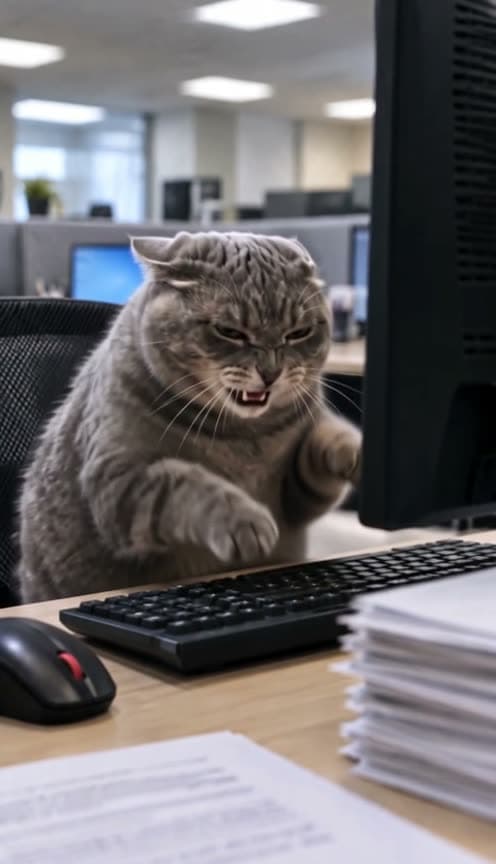
One photo in, and out comes you at work, completely done with it: typing fast, one sharp key, a long stare at the screen, then a full keyboard smash. Here's one made from a single photo of a grey munchkin cat:
Me At Work
One photo. You or your pet at an office desk, typing, staring, then smashing the keyboard. 8 seconds, vertical.
What You Get
- The desk. A grey open-plan office, fluorescent ceiling panels, blue screens glowing in soft bokeh behind you, paper stacks on the desk and a black mouse with a red scroll wheel in the foreground.
- The flow state. Four seconds of typing fast, locked in.
- The one key. You stop dead and hit a single key with a lifted hand or paw.
- The stare. A beat of total stillness, eyes on the monitor.
- The smash. Both hands or paws slam the keyboard four or five times and the papers jump.
- Office sound, no music. Keyboard clacking, office hum, and a small sigh (or a grumpy mrrp from pets).
- 8 seconds, vertical 9:16, one static shot, ready for TikTok, Reels and Shorts.
What the Trend Actually Is
The original is a TikTok of a chonky cat in a wizard hat at an office keyboard, posted as "me at work". There's no dialogue and no setup. It's a cat at a desk, and everyone who has ever had a Monday knows exactly what it means.
The joke is the build: focused, then irritated, then perfectly still, then done. That's why it spread as a work meme and a "done with work" reaction, and why people keep searching for "cat typing" and "cat at work" to find it.
Why it suits AI: the meme only works with a real cat that happened to sit at a keyboard. One photo puts your cat, your dog or you in the chair, with the same beats every time.
The Beats
| Time | What happens |
|---|---|
| 0–4s | Typing fast, in a flow state |
| ~4s | Stops dead, lifts a hand or paw and hits ONE key |
| 4.8–6s | Completely still, staring at the screen |
| 6–8s | Smashes the keyboard 4–5 times with both hands or paws, papers jumping |
The eyes stay on the monitor the whole time. Nobody looks at the camera.
Pets Welcome
- Chunkier on purpose. Your pet is drawn a little rounder than in the photo, in the spirit of the original chonk.
- In the chair. It sits upright on the office chair with real paws on the keys, never human hands.
- A slow burn. Locked in while typing, then eyes narrowing and ears turning, an annoyed squint on the single key, an about-to-snap glare in the pause, and fully mad with ears pinned, hissing or yowling, through the smash.
People play it the other way: deadpan the whole time, in their own clothes, slamming their palms flat from about a foot above the keyboard.
Use one clear, well-lit photo where the face is sharp. The office, the desk and the beats come from the template; your photo only decides who's in the chair. Want a coffee mug on the desk or a different office? Put it in Director's Notes.
The Fastest Way
Me At Work
One photo, the full 8-second keyboard smash with office sound. People and pets.
One photo, 100 credits (about $5), no prompt. It renders on Seedance 2.5 at 480p, vertical 9:16.
Build It Yourself
This one needs no driving clip. The whole performance comes from the prompt.
1. Make one still of the subject at the desk. Lock the camera before you animate, because the shot never moves.
A photorealistic vertical still of the subject from the reference photo sitting at an office desk, shot on an 85mm lens from desk height, three-quarter view from the front-left. A tall dark monitor at the right edge of frame, the keyboard on a diagonal in front of them, a black mouse with a red scroll wheel in the foreground, stacks of paper on the desk. A grey open-plan office behind them with fluorescent ceiling panels and blue screens in soft bokeh. Fine film grain. Eyes on the monitor. Keep their exact face and their own clothes. No text.
2. Write the beats with times. Eight seconds is short, so give the model the four beats in order with their timestamps (the table above), and say the camera stays static and the eyes stay on the monitor throughout.
3. For a pet, write the face as a progression. List the expression for each beat, from locked in to fully mad, so the anger builds instead of arriving all at once. Say it sits upright with real paws.
4. Describe the sound. Keyboard clacking, office hum, a small sigh or a grumpy huff, and no music.
Common Mistakes
Moving the camera. The joke is the stillness of the shot. A push-in or a cut softens the stop and the stare.
Skipping the pause. The 4.8–6s stare is what makes the smash funny. Rush it and it's just a cat hitting a keyboard.
Letting the eyes wander. The subject never looks at the camera. A glance at the lens turns a work meme into a pet video.
FAQ
How many photos? One.
People or pets? Both: a person, a cat, a dog or any animal.
How long is it? 8 seconds, vertical 9:16.
What does it cost? 100 credits, about $5.
Related Reading
- How to Make the 'I Heard You The First Time Bro' AI Video: another deadpan worker, behind a checkout counter
- How to Make the 'Hold On, I'm On the Phone' AI Pet Video: a pet with somewhere better to be
- How to Make the 'I'm Just Thayin'' AI Video: a viral one-take meme, starring you or your pet
- How to Make Your Pet Dance: pets doing people things