Quick answer
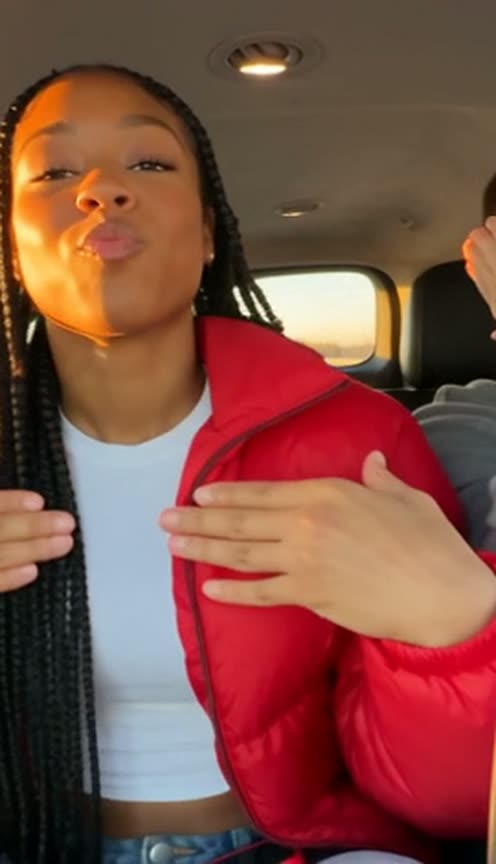
Starrd's Quiet on the Creek template recreates the viral car singalong with you and three friends. Upload four photos: photo 1 sits in the middle of the back seat and leads, photo 2 sits on the right, photo 3 on the left and photo 4 in the seat in front. In one handheld phone take the camera starts on the back seat, whips to the friend up front, comes back for the hand moves (framing your face, covering your eyes, blowing kisses, cupping your ears), swings to the front seat again, then catches everyone laughing over a phone and ends on a close-up. Everyone keeps the outfit from their photo. The motion is copied from the original clip as a depth map, widened to 16:9 so all four seats stay in frame, and the sound is the trend's original audio. 13 seconds, widescreen 16:9, Seedance 2.5, 480p, 150 credits (about $7.50).
The "Quiet on the Creek" car singalong, with you and three friends in the seats. The phone whips from the back seat to the front and back while you do the hand moves to Saucy Santana's song. Here it is:
Quiet on the Creek
Four photos. You and three friends sing along in the back of an SUV at golden hour. 13 seconds.
What You Get
- All four of you in the car. Three in the back seat, one in the seat in front, each in their own seat for the whole video.
- The hand moves. Framing your face, covering your eyes, blowing kisses with both hands, cupping your ears, hands on your chest, on the beat.
- The phone whip. One handheld take that swings to the front seat twice and back.
- The ending. Everyone cracking up over a phone, then a close-up of your friend grinning into the lens.
- Golden hour. Warm low sun through the windows and an open road outside.
- Your own outfits and the trend's original sound, 13 seconds, widescreen 16:9.
What the Video Actually Is
"Quiet on the Creek" is a Saucy Santana song, and the trend is a car clip set to it: a group of friends packed into the back of an SUV, singing along and doing little hand moves to the lyrics while whoever holds the phone swings it around the car. It's loose, loud and filmed like any road trip video.
AI template sites started offering their own versions in late October and early November 2026. Most of them crop the original square video, which cuts off the friends on the sides. We widened it to 16:9 before building the template, so all four seats stay in the shot.
Why it suits AI: getting four friends in one car at golden hour with someone filming is the hard part. Four photos skip it, and everyone still looks like themselves.
The 13 Seconds, Beat by Beat
| Time | What happens |
|---|---|
| 0:00 | Wide on the back seat: you in the middle grin at the lens, the friend on the right waves |
| 1.1s | The phone whips to the friend in the front seat, dancing with a hand up |
| 2.1s | Back to the back seat: the hand moves, framing your face and covering your eyes |
| 3.5s | Blowing kisses with both hands, cupping your ears, hands on your chest |
| 6.7s | The phone swings to the front seat again: your friend sings looking out at the road |
| 8.5s | Back seat: you look down at a phone and burst out laughing, the others with hands on their heads |
| 11.3s | The phone pushes in and swings onto the friend on the right, grinning into the lens |
Your Look, Your Seats
- Your own outfits. Whatever each of you wears in your photo, you wear in the car.
- Photo order sets the seats. Photo 1 is the middle of the back seat, photo 2 the right, photo 3 the left, photo 4 up front.
- The car. A big SUV with black leather seats and a grey roof, sunlight flaring through the windows.
Put your clearest, best-lit photo first: the middle of the back seat gets most of the close moves. Photo 2 gets the close-up at the end, so make that one sharp too.
The Fastest Way
Quiet on the Creek
Four photos, one car, the hand moves and the phone whip, with the trend's original sound.
Four photos, 150 credits (about $7.50), no prompt. It renders on Seedance 2.5 at 480p, widescreen 16:9, 13 seconds.
Build It Yourself
1. Widen the clip, then turn it into a depth map. The original is nearly square, so outpaint it to 16:9 first (an AI reframe tool works) and check every frame for zoom jumps where the tool joins its segments. Then run it through a depth-estimation model (Depth Anything V2 works). The depth map keeps every hand move and every whip of the phone and drops faces, jerseys and colour, so the original people never leak into your video.
2. Make a character sheet. Four face close-ups across the top and each friend seated across the bottom, generated from your photos with the car softly out of focus behind every panel. It tells the video model who sits where and what they wear, and nothing about poses.
A photorealistic WIDE 16:9 CHARACTER REFERENCE SHEET of four friends, two rows of four equal panels: a head-and-shoulders close-up of each friend on top, and each friend seated in a car seat from the knees up below, the inside of a big SUV at golden hour softly out of focus behind every panel. No text.
3. Drive it with the depth map. Feed the sheet, your photos and the depth video to a model that copies motion from a reference video (we recommend Seedance 2.5). Then write the things it can't read from a depth map:
- Who sits where: middle, right and left of the back seat, and the seat in front, and that nobody ever changes seats.
- The timeline: when the phone whips to the front seat and back, and which hand moves come when.
- One take: say there are no cuts, only the phone moving.
Render it silent and lay the original audio back on at the end.
Common Mistakes
Cropping the square clip to vertical. The friends on the sides get cut off for most of the video. Widen it instead.
Not pinning the seats. Four people close together look alike to the model; without seat rules they swap places mid-take.
Letting the jerseys through. If the prompt doesn't say whose clothes come from where, the original's outfits creep back in. Say everyone wears the clothes from their photo.
A blurry photo 1. The middle seat gets the close moves; a soft photo shows up there first.
FAQ
How many photos? Four, one per seat.
How long is it? 13 seconds, widescreen 16:9.
What does it cost? 150 credits, about $7.50.
Do we keep our outfits? Yes, all four of you.
Related Reading
- How to Make the 'Dip On Em' AI Dance Video With 3 Friends: the other four-photo group trend this month
- How to Make the Careless Whisper Car AI Video: another car singalong
- How to Make the Old Town Road AI Video: ride shotgun and sing a verse each
- Viral AI Video Trends 2026: every trend we've turned into a template this year