Quick answer
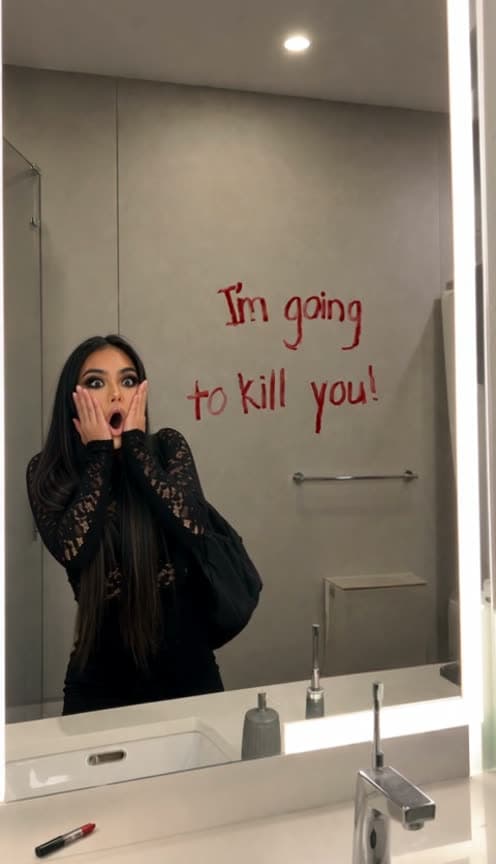
Upload one photo to Starrd's I'm Going To Kill You Mirror template and it puts you, or your pet, in front of a bathroom mirror with "I'm going kill you" written on it in red lipstick. You flick the light on, see the message and jump, then tilt your head because the grammar is wrong, pick up the lipstick, write the missing "to" and add a "!", put the lipstick down, read it again and scream even harder. It's one continuous phone shot into the mirror that follows the original video beat for beat, with its horror stings landing on both scares. 15 seconds, vertical 9:16, 100 credits (about $5).
One photo in, and out comes you, scared of a typo: a threat on the bathroom mirror, a scream, a quick grammar fix, and a much bigger scream. Here's one made from a single selfie:
I'm Going To Kill You Mirror
One photo, you or your pet. Find the lipstick threat, fix the grammar, scream again. 15 seconds, one take, vertical.
What You Get
- The bathroom. A bright, slightly cramped bathroom, filmed on a phone into the mirror, filling the whole vertical frame from the ceiling light down to the sink.
- The threat. "I'm going kill you" scrawled across the glass in red lipstick, the "to" missing.
- The first scare. The light flicks on, you look up, and you jump with a hand over your mouth.
- The fix. A head tilt at the bad grammar, then you calmly write in the "to" and add a "!".
- The second scare. You put the lipstick down, read "I'm going to kill you!" and scream harder.
- The original's timing. Every beat, expression and movement follows the original video, with a horror sting on each scare.
- 15 seconds, vertical 9:16, one continuous take, ready for TikTok, Reels and Shorts.
What the Trend Actually Is
The original is a short mirror-prank clip: a girl in a striped hoodie walks into a bathroom, flicks on the light and finds a threat written on the mirror in lipstick. She's terrified for about two seconds. Then she notices the threat is missing a word.
What she does next is the joke. Fear switches to mild disapproval, she fixes it like a teacher marking homework, and only when she reads the corrected sentence does it land that she has just made the threat worse. It travelled as "she saw 'I'm going to kill you' in the mirror", but everyone shares it for the grammar fix.
Why it suits AI: you need a mirror, a lipstick and a willing friend to write on your bathroom. One photo skips all of that, and it works on your dog too.
The Beats
| Time | What happens |
|---|---|
| 0–1s | You walk in and flick the light on |
| 1–1.5s | You look up at the mirror and jump, hand over your mouth |
| 1.5–5s | Frozen, then the hand comes down and your head tilts: the grammar is wrong |
| 5–10s | You pick up the lipstick, write the "to" and add the "!" |
| 10–12.5s | You cap the lipstick and put it down on the counter |
| 12.5–15s | You read "I'm going to kill you!" and scream harder |
People or Pets
The template reads your photo. A person stands at the sink and writes with their hand. A dog, cat or any other animal stands up at the mirror on its hind legs, covers its muzzle with its paws on each scare and writes with the lipstick in its paw: real paws, never human hands.
Use one clear, well-lit photo where the face is sharp. For pets, a photo that shows the whole animal standing or sitting upright works best.
The Fastest Way
I'm Going To Kill You Mirror
One photo, the full 15-second grammar fix in one take, with the original's horror stings. People and pets.
One photo, 100 credits (about $5), no prompt. It renders on Seedance 2.5 at 480p, vertical 9:16.
Build It Yourself
This one is driven by the original video, not by a written story. Prompt-only versions get the beats in the right order but miss the timing: the scare lands a second or two late and the sting plays over a calm face.
1. Make one frame of you in the original's mirror. Take a frame from the original and swap the girl for your subject. Extend the bathroom up and down to fill a vertical frame, and keep the lipstick message word for word.
Image 1 is a photo of the star. Image 2 is a frame from a phone video filmed into a bathroom mirror. Recreate Image 2 as a photorealistic vertical 9:16 frame: extend the same bathroom up to the ceiling light and down to the counter and sink, and replace the young woman in the reflection with the person from Image 1, wearing their own clothes. Keep the red lipstick handwriting exactly: "I'm going" on the top line and "kill you" on the second line, spelled K-I-L-L, with a little space to the left of "kill".
2. Drive it with the original clip. Use the original as the motion reference so every expression and every beat lands where it should, then lay the original sound back on top.
3. Ask for one take. The original cuts to an over-the-shoulder angle while she writes. Say plainly that the camera never cuts and stays on the mirror the whole time.
4. Pin the "to". When you drop the over-the-shoulder shot, the writing tends to vanish with it. Give the "to" its own timestamp and say it stays readable to the last frame.
Common Mistakes
Writing the "to" in advance. If the opening frame leaves a drawn gap or a box, the model fills it before the subject ever picks up the lipstick, and the joke is gone.
A late first scare. The sting should hit as the hand goes to the mouth. If the scare is late, the most frightening sound in the clip plays over a calm face.
Covering the words. A pet standing right in front of the message hides the new "to" behind its ears. Keep the head beside the words, not on top of them.
FAQ
How many photos? One.
People or pets? Both.
How long is it? 15 seconds, vertical 9:16, one continuous take.
What does it cost? 100 credits, about $5.
Related Reading
- How to Make the 'Caught By The Sniffer Dog' AI Video: another one-take meme where your face says everything
- How to Make the 'Me At Work' Keyboard Smash AI Video: a deadpan meme, starring you or your pet
- How to Make the 'I Heard You The First Time Bro' AI Video: a reaction meme, starring you
- Viral AI Video Trends (2026): The Monthly Roundup: every trend worth making this month