Quick answer
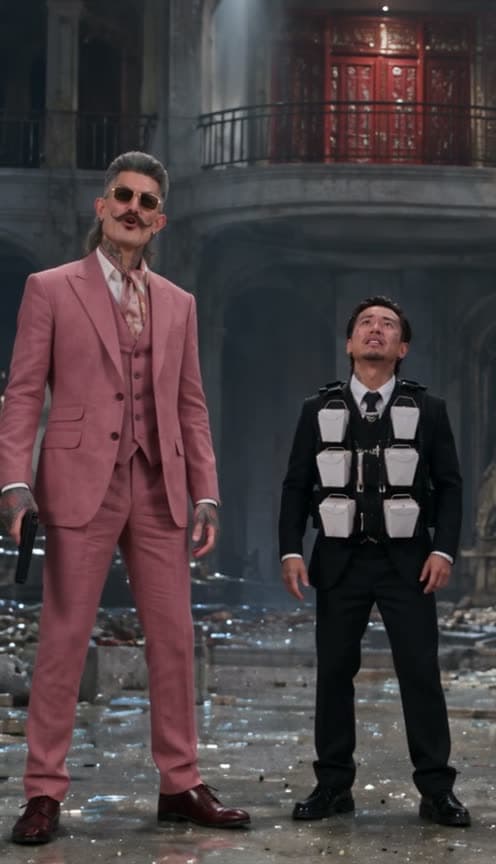
Starrd's Push The G*ddamn Button template recreates the "push the button" standoff from the finale of Rush Hour with 1 to 3 photos. Photo 1 holds the pistol on the villain and calls his bluff: "Come on. Push the button." Photo 2 is shown small, in a black school uniform and a vest of white Chinese takeout boxes, and plays along a little too well: "Push the g*ddamn button!" Photo 3 is the villain up on the balcony, who never says a word. Any role without a photo gets an AI-generated stranger. All 14 shots, every line lip-synced to the original audio, 22 seconds, vertical 9:16, Seedance 2.5, 250 credits (about $12.50).
Up to three photos in, and out comes you and your friends in the Rush Hour "push the button" standoff: one of you calls the villain's bluff with a pistol, one of you plays along far too loudly, and one of you is the villain who never blinks. All 14 shots, every line lip-synced. Here it is:
Push The G*ddamn Button
Up to three photos. One of you calls the bluff, one of you yells 'push the g*ddamn button!', one of you is the villain. 22 seconds, lip-synced.
What You Get
- The whole standoff. All 22 seconds and all 14 shots, from "Come on." to "You heard what she said.", cut at the same moments as the movie.
- Three roles. Photo 1 has the gun, photo 2 is shown small in the school uniform, photo 3 is the villain. Missing photos get AI-generated strangers.
- Real lip sync. Photo 1 and photo 2 mouth their own lines to the original audio; the villain keeps a cold, closed mouth the whole time.
- The performances. Photo 1's cocky grin, the whispered "play along", the shock when photo 2 joins in and the slow side-eye; photo 2's terrified start, eyes squeezed shut, teeth gritted and furious yelling; the villain's unblinking glare.
- No bomb. Photo 2's vest is packed with white Chinese takeout boxes.
- 22 seconds, vertical 9:16, ready for TikTok, Reels and Shorts.
What the Scene Actually Is
It's the finale of Rush Hour (1998), in a wrecked museum hall. Detective Carter has a pistol on the villain, who stands on a balcony with the detonator, and the kid next to Carter is the one wearing the bomb. Carter's plan is to bluff. The kid's plan, it turns out, is to bluff harder.
The clip came back on TikTok on June 9, 2026, reposted by @cultureratedpv with the caption "She was pressed, she the button.", and passed 568,000 plays and 37,000 likes.
Why it suits AI: the joke is three faces and a perfectly timed escalation. A few photos let you and your friends play all three roles, no museum required.
The Script, Beat by Beat
| Time | Who | Line |
|---|---|---|
| 0:00 | Photo 1, pistol up, grinning | "Come on." |
| 2.5s | Photo 1, off screen, over the villain's glare | "Push the button. Come on. Push the button." |
| 5.6s | Photo 2, in profile, whispering | "What are you doing?" |
| 7.0s | Photo 1, leaning in, whispering | "I'm just playing. Play along." |
| 8.4s | Photo 1, aiming up at the balcony | "Come on! Push the button!" |
| 10.3s | Photo 2, arms out, shouting up | "Yeah! Come on! Push the button!" |
| 14.1s | Photo 1, off screen, over the villain's stare | "Blow everybody up!" |
| 15.5s | Photo 2, eyes squeezed shut | "Yeah! Blow everybody up!" |
| 17.1s | Photo 1, teeth bared | "Push the g*ddamn button!" |
| 18.0s | Photo 2, furious | "Push the g*ddamn button!" |
| 20.8s | Photo 1, deadpan, side by side with photo 2 | "You heard what she said." |
Who plays who: photo 1 has the gun, photo 2 yells the punchline, photo 3 is the villain. Give photo 2 to the friend who commits hardest.
Your Look, Their Hall
- Photo 1 and photo 3 wear their own clothes, glasses and jewellery from their photos.
- Photo 2 wears the uniform: a black blazer, a white shirt and a black tie, a skirt or trousers depending on who they are, and the takeout-box vest, with their own face, hair and glasses.
- Their hall. Pale grey-blue walls, a tall arched alcove, smashed glass and rubble on the floor, and the villain up on a balcony in front of red lacquered Chinese panels.
Use clear photos where the face is big and well lit. Most of the 22 seconds are close-ups, and photo 2's face carries the punchline. If two of you are dressed alike, that's fine: the template tells everyone apart by hairstyle as well as clothes.
The Fastest Way
Push The G*ddamn Button
Up to three photos, the full 22-second standoff with the original audio, every line lip-synced.
One to three photos, 250 credits (about $12.50), no prompt. It renders on Seedance 2.5 at 480p, vertical 9:16.
Build It Yourself
1. Turn the clip into a depth map. Run it through a depth-estimation model (Depth Anything V2 works), with the contrast set per shot: the extreme close-ups and the two wide shots have very different depth ranges. The repost has burned-in subtitles, so mask the white letters in each frame and paint them out of the depth frames.
2. Give the kid's role a plain head. Her long straight hair comes through the depth map as a clear outline, and whoever plays photo 2 ends up with it, or with a black hood if you only smooth it. Find the hair with a segmentation model (CLIPSeg works), keep only a head-sized dome, and replace the rest with the background depth above the chin and the body's depth below it.
3. Make one storyboard sheet of the moments that last. Six panels: photo 1 with the pistol up, photo 2 scared, the villain's glare, photo 2 shouting in the wide shot, photo 2 yelling in close-up and the final wide shot of the two of them looking up. Generate them all from the photos in one hall.
A close-up of the face and shoulders of the person from reference image 2, scared and close to tears, the lips trembling, in a black school blazer, a white collared shirt and a thin black tie, and over it a black strap vest packed with rows of small white Chinese takeout boxes with thin wire handles, two columns of them across the chest. A wrecked museum hall at night behind, pale grey-blue walls, cool light from above. A still from a late-90s action comedy, natural film colour. No text.
4. Drive it with the depth map and the dialogue. Put the original audio inside the depth video, but mute every line spoken off screen (photo 1's voice over the villain's shots, photo 2's voice over photo 1's reactions), so nobody on screen mouths someone else's words. Feed the sheet, the photos and the depth video to a model that copies motion from a reference video (we recommend Seedance 2.5). Then write three things it can't get from a depth map:
- A timed shot list: who is on screen, the framing and the line for each of the 14 shots.
- The speaking windows: exactly when each mouth moves, and that the villain's never does.
- The faces: photo 1's grin, whisper, shock and side-eye; photo 2's fear turning into fury; the villain's cold stare.
Lay the full original audio back on at the end.
Common Mistakes
Keeping the 1-second cutaway. The original cuts to someone peeking over a ledge for about a second. With three roles, nobody is there to play him. Cut it and let the villain's stare start a beat earlier; nobody speaks in either shot, so the audio doesn't move.
Leaving the kid's hair outline in. It overrides photo 2's own hair, as long hair in one render and as a hood when only smoothed. Replace it with a plain head (step 2).
Describing the stranger like the original actor. An AI-made villain described as "a grey-haired man in a tuxedo" comes out looking like the movie's villain. Describe someone clearly different.
Forgetting who stands where. In the wide shots photo 1 is on the left and photo 2 on the right. Say so in every wide, or they swap places.
Starting on the first line instead of the first cut. A transcription puts "Come on" before the cut to Carter, but the voice actually starts a fifth of a second after it. Start on the cut.
FAQ
How many photos? One to three. Missing roles get AI-generated strangers.
Is it the full scene? It's the whole standoff, from "Come on." to "You heard what she said.", 22 seconds.
How long is it? 22 seconds, vertical 9:16.
What does it cost? 250 credits, about $12.50.
Related Reading
- How to Make the White Chicks 'A Thousand Miles' AI Video: another comedy movie scene, starring you and a friend
- How to Make the 'Every Time Working, No Stopping' AI Video: a two-person chat with a straight-faced punchline, lip-synced
- How to Make the 'Put a Mind Chip' AI Interview Meme: the deadpan dinner interview, starring you and a friend
- Viral AI Video Trends 2026: every trend we've turned into a template this year