Quick answer
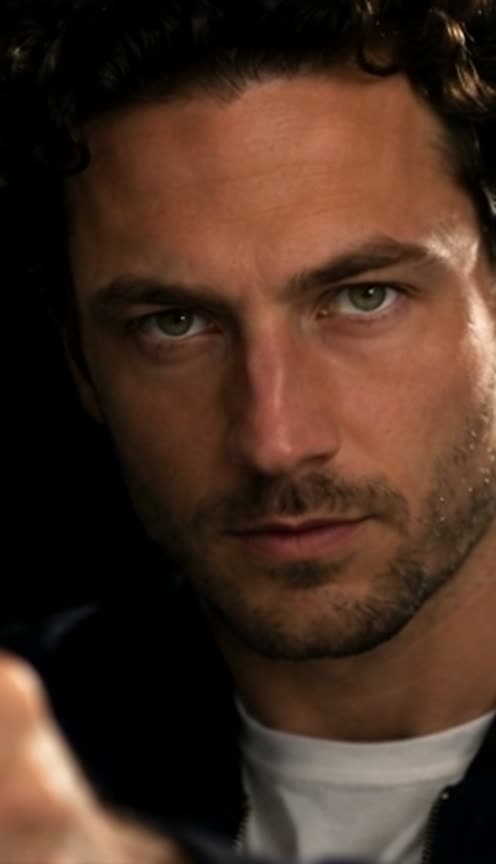
Starrd's James Bond Reveal template puts you in the spy-movie teaser reveal that took over TikTok in November 2026. It's one continuous 8-second shot in near-total darkness: a hard light first finds your hand gripping a black pistol in the out-of-focus foreground, then your face fades up out of the shadow behind it, half lit and half dark, and holds a cold stare straight into the lens while the camera creeps closer. At the end the hand lowers out of frame and your face holds the screen alone. You keep your own face, hair and outfit, and the pistol always points off to the side, never at the camera. 1 photo, 8 seconds, widescreen 16:9, 480p, Seedance 2.5, 150 credits (about $7.50). Works with pets too.
Eight seconds, one shot, nothing but darkness and a hard light. One photo puts you in the spy-teaser face reveal:
James Bond Reveal
Out of total darkness a light finds your hand on a pistol, then your face rises out of the shadow and stares down the lens. 1 photo, 8 seconds.
What You Get
- One continuous shot, no cuts, in widescreen 16:9.
- The reveal, timed: the hand first, then your face fading up out of the dark, then the full stare.
- Hard side light: one side of your face lit, the other in deep shadow, against pure black.
- A slow push in as you hold the stare.
- Your own face, hair and outfit, straight from your photo.
- A pistol held side-on in the soft-focus foreground, pointing off-frame, never at the camera.
- The trend's sound underneath.
- Pets welcome: a dog or cat with its own paw on the pistol.
What the Video Actually Is
It's a recreation of the moody teaser shot that kicked off a wave of spy-reveal edits in November 2026: a figure hidden in the dark, a gun hand caught in a sliver of light, and a face that slowly turns up out of the shadow to stare down the lens. Rival AI apps picked it up within days of each other, and people have been dropping themselves, their friends and their pets into it since.
This is an unofficial, fan-made look. Starrd isn't connected to the James Bond films, and the template has no title cards, logos or theme music.
Why it suits AI: the whole effect is lighting. Getting a single hard light to rise across your face in a pitch-black room is a real film-set job; one photo does it here.
The 8 Seconds
| Time | What happens |
|---|---|
| 0.0s | Near-total darkness. A thin light finds only your hand gripping a pistol in the lower-left foreground |
| 1.2s | The light rises: your face fades up out of the shadow behind the hand, eyes first |
| 2.6s | The full reveal: half your face lit, half in shadow, staring straight into the lens |
| 2.6s to 6.9s | The camera creeps slowly closer; the hand and pistol stay steady and out of focus |
| 6.9s | The hand lowers out of the bottom of the frame |
| 7.4s | Your face alone, still staring |
Your Look
Everything comes from your photo: your face, your hair, your facial hair, your glasses and your clothes. The shot is a close-up, so only your head, shoulders and the top of your outfit show. Nobody gets a tuxedo unless you ask for one.
Use a clear, front-facing photo with your whole face visible and no sunglasses. The last five seconds are a tight close-up, so your face fills the screen.
The Fastest Way
James Bond Reveal
One photo. Out of the dark, your face rises behind a pistol and stares down the lens. 8 seconds, widescreen.
One photo, 150 credits (about $7.50), no prompt. Widescreen 16:9, 480p, 8 seconds, with sound. Works with pets. Find it in Movie Scenes.
Build It Yourself
1. Get the motion from a real take. The push in, the head turn and the moment the hand drops are what sell it. Film yourself in a dark room, or use a reference clip, and copy its movement rather than describing it.
2. Make a three-frame storyboard first. One still per beat (hand in the dark, face half lit, full reveal) fixes the light and your face before any video is made.
Image 1 is a photo of a person. Make a photoreal vertical sheet of three wide 16:9 film stills stacked top to bottom, thin black lines between them, no text. All three are one tight close-up against pure black with a single hard light from the right. Top: almost total darkness, only the person's hand lit in the lower-left foreground, out of focus, holding a black pistol side-on with the muzzle pointing off-frame to the left; the face is lost in shadow. Middle: the face emerges, right side lit, left side in shadow, eyes on the lens, mouth closed. Bottom: the face fully lit and a little closer, a cold stare into the lens. Same face, hair and clothes as Image 1.
3. Drive a video model with the movement. Feed the storyboard, your photo and the reference movement to a model that copies motion from a video, and time the light: dark until about 1 second, the face fading up until about 2.5 seconds, then the full stare. Starrd's Character Swap does the swap on your own clip.
Common Mistakes
Lighting the whole face from the start. The reveal is the point. If the face is visible in the first second, there's nothing left to reveal.
A gun aimed at the lens. Models love a barrel-first shot. Say side-on, muzzle off-frame, every time, or you get the wrong kind of video.
Borrowing the reference actor's hair. A motion reference carries the original performer's head shape. Tell the model your hair comes from your photo, or your curls turn into their swept-back look.
A moving mouth. There are no lines. If you don't say the mouth stays shut, the model has you muttering.
Adding a title card. Keep it to the shot. Logos and franchise titles belong to the films.
Related Reading
- How to Make the 'End of Watch' AI Video: another movie scene, starring you
- How to Make the 'Mr. & Mrs. Smith' AI Video: a widescreen couple edit from an action comedy
- How to Make the Rush Hour 'Fantasy' AI Video: another widescreen movie scene
- How to Make the Rush Hour 'Push the Button' AI Video: a movie standoff, starring you
- How to Put Yourself in Any Video With AI: character swap on your own clip
- Viral AI Video Trends 2026: every trend we've turned into a template this year