Quick answer
Upload two pet photos to Starrd's I Got That Feeling template and it puts both of them standing upright on their hind legs doing the dance, side by side in a real room. It costs 100 credits (about $5), takes two photos — one pet each — and comes out vertical 9:16 at 8 seconds with the trend audio underneath — one pet dancing alone, then the other walks in and joins.
The same dance, any subject — tap one to make it with your photo.
Two photos in, and out comes one pet dancing alone — then the other walks in, stands up on its back legs and joins in a real room. Here's exactly what you get:
I Got That Feeling
Two photos, your own place. One pet dancing, then the other walks in and joins. No prompt to write.
What the Trend Actually Is
This one belongs to a family that has been quietly running for a while: the standing-pet dance. An animal is up on its hind legs, front paws held out in front of its chest working like a pair of arms, bobbing through a short routine on somebody's living room floor.
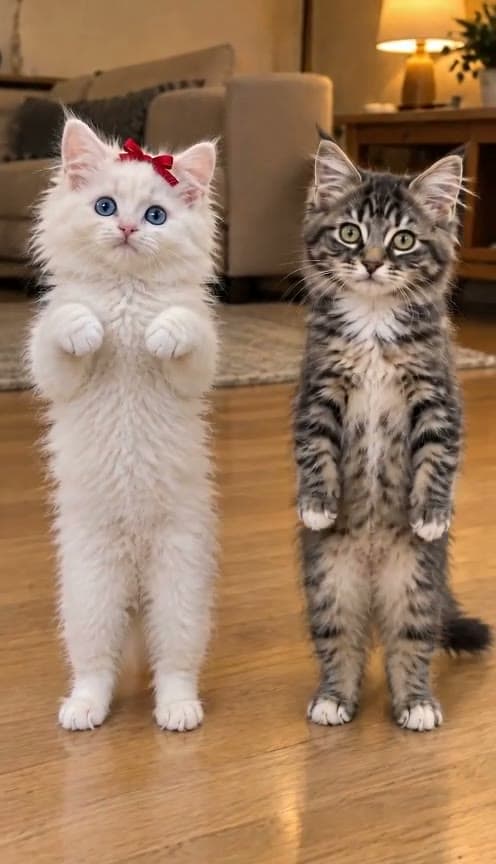
The clip this template copies comes from the Tiny Odd Pets account on TikTok — two kittens, a white one with a red bow and a black one, doing it side by side on a wooden floor with a lamp glowing behind them. It starts as a solo and the second kitten wanders in partway through, which is when it gets good.
Why it works: it's the gap between how a cat actually moves and how a person moves. A pet doing a whole human gesture — paws up, weight shifting, holding the pose — is funny in a way that a pet just being a pet isn't. And two of them doing it together is twice the joke for the same eight seconds.
The Two-Slot Rule
The order you upload decides the side:
| Slot | Position |
|---|---|
| Photo 1 | The pet on the left |
| Photo 2 | The pet on the right |
That's the whole contract. Each slot is one animal — don't put a photo with two pets in it into a single slot, because then the casting is ambiguous and you'll get a blend.
Your pets do not need to be standing up in the photo. Send a completely normal picture of them sitting, or on all fours, or loafing on the couch. Standing them upright is a step the template does for you before it ever animates anything — which is precisely why it works on animals that would never hold that pose for a camera.
The Fastest Way
I Got That Feeling
Two pet photos. Both of them upright, dancing, in your own room. 8 seconds, vertical, real sound.
Two photos, 100 credits, no prompt. The template handles standing them up, the room, the routine and the audio.
Build It Yourself
If you'd rather wire it by hand, this is a video-to-video job: a fixed clip supplies the dance, and one composed still supplies the two animals.
1. Make the still first. One vertical image of both pets standing fully upright on their hind legs, side by side, with a clear gap of floor between them and both visible head to feet. This step decides whether the animals are even capable of the routine, and it's cheap to iterate — generate the still on its own and look at it before paying for any video.
The thing that matters most here is that they're upright and full-body. A pet photographed on all fours, animated directly, just stays on all fours.
2. Then drive it with the clip.
Image 1 shows the TWO characters. Video 1 is the performance to copy.The character on the LEFT of Image 1 copies the LEFT performer's moves. The character on the RIGHT of Image 1 copies the RIGHT performer's moves.The subjects do the same exact moves as Video 1 for the whole video, standing upright on their hind legs the entire time, their front paws working as arms and making exactly the movements the performer on that side makes.FACES: each character's eyes, ears, mouth and head follow the face of the performer on its own side in Video 1, moment for moment.The camera is the one from Video 1 — the same handheld phone, held by a person, drifting and reframing slightly the way a real hand does. Keep that drift. It is never locked off on a tripod and never perfectly still.The entire clip is the two characters from Image 1. Every frame from the first to the last shows only them.
Model choice: run it on Seedance 2.0 in video-to-video mode. It animates two characters independently, which is the requirement — engines that drive every subject in a still from a single skeleton will make both pets move in perfect unison, which looks exactly as wrong as it sounds.
Common Mistakes
Describing the dance in the prompt. This is the big one and it's counterintuitive. Writing "bouncing on the beat" or "waving their paws" makes the result worse — the model satisfies your description with the smallest possible version of the move and discards the real routine. Say only that the moves are copied from the reference, and let the clip supply them.
Inventing a pet-sized version of the move. If you tell it the animal does a "little paw wave," that's what you get. The whole appeal is the animal doing the whole human gesture. Ask for the full movement.
Naming an emotion. "Happy," "excited," "smiling" produces one expression frozen for the entire clip. Name the parts instead — eyes, ears, mouth, head — and point them at the reference.
Locking off the camera. A perfectly steady frame is one of the fastest ways to make a clip read as AI. The source was shot handheld and drifts; keeping that drift is doing real work.
Two pets in one photo slot. Each slot is one animal. A group shot makes the casting ambiguous.
FAQ
Which pet goes where? Photo 1 is on the left, photo 2 is on the right.
Can I mix a cat and a dog? Yes — our test render was a tabby and a corgi.
Do they need to be standing in the photo? No. Send a normal photo; the template stands them up.
Only one pet? Use Camden Bop — solo, and it handles animals well.
Related Reading
- How to Make the Camden Bop AI Video — the solo version, also pet-friendly
- How to Make Your Pet Dance with AI — the pet-dance pillar
- How to Make the Hotel Lobby AI Video — the same two-character engine, with people
- How to Make a Kung Fu Cat Video — the other standing-pet format
- How to Make an AI Dance Video — the dance pillar