Quick answer
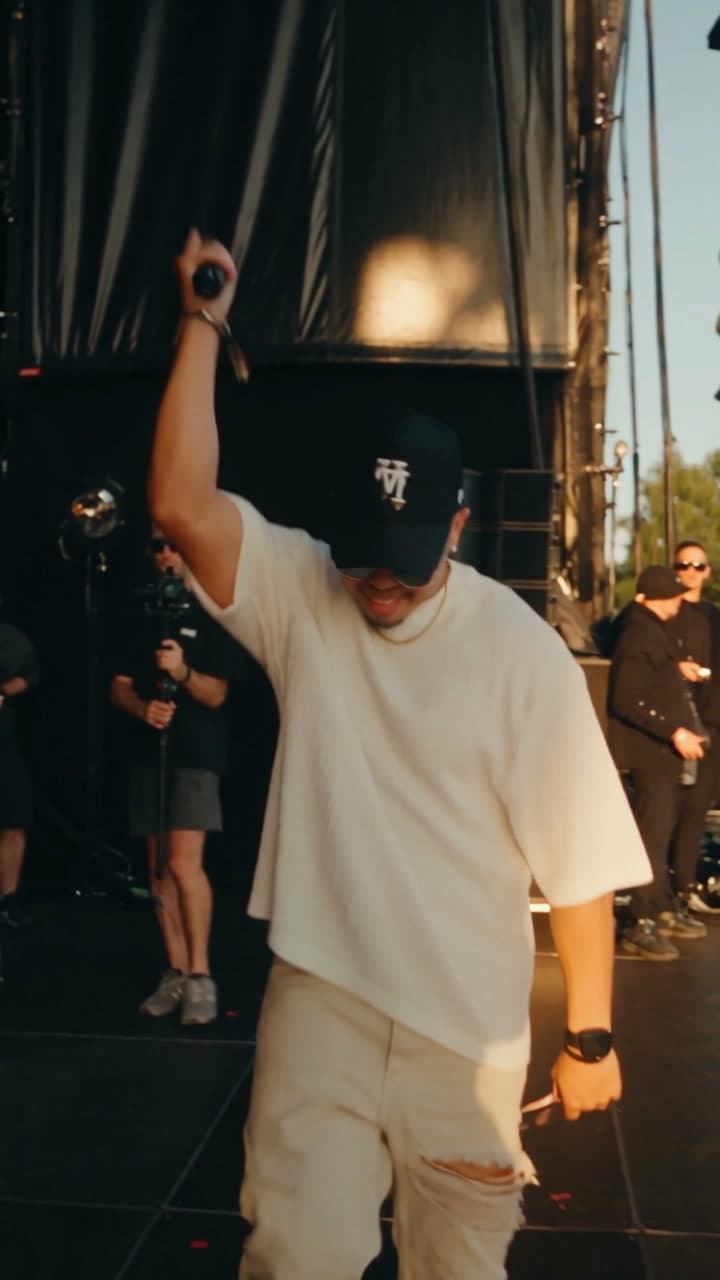
Starrd's Lil Yachty Walkout template puts you in the 'hardest walkout ever' meme. Upload one photo: you walk out from backstage at a huge outdoor festival, past the curtains, speaker stacks and camera crew, raise the mic high, step out and turn to the crowd, then high-step all the way down the runway and back in warm golden-hour light. It's one continuous take that follows the walkout move for move, and you keep your own face, hair and the clothes from your photo. Director's Notes can change the look: a different outfit, a hat, sunglasses, a chain or a new hairstyle. 26 seconds, vertical 9:16, 480p, 220 credits (about $11).
The same dance, any subject — tap one to make it with your photo.
You come out from backstage, throw the mic in the air, turn to a festival crowd and high-step down the runway like it's the biggest show of your life. One photo puts you in the Lil Yachty walkout, the "hardest walkout ever" meme. Here it is:
Lil Yachty Walkout
One photo. You walk out from backstage, raise the mic and high-step down the runway into a festival crowd. 26 seconds.
What You Get
- The whole walkout, one take. No cuts: the camera follows you from backstage, onto the stage and down the runway.
- Backstage first. You walk out past black curtains, speaker stacks and a camera crew before anyone sees you.
- The mic in the air. You raise it high right before you step out.
- The runway. You turn to the crowd, then high-step all the way down the runway and back toward the camera.
- A huge crowd at golden hour. A packed outdoor festival field under warm sunset light.
- Your own look, or a new one. Your face, your hair and the clothes from your photo, or change the outfit with Director's Notes.
- 26 seconds, vertical 9:16, with sound, ready for TikTok, Reels and Shorts.
What the Meme Actually Is
The walkout is from Lil Yachty's set at Lyrical Lemonade's Summer Smash festival in 2021. He comes out from backstage, lifts the mic and struts down the runway with big, slow high steps while the crowd goes off. A clip posted to YouTube in June 2022, titled "Lil Yachty with the HARDEST walk out EVER", has passed 19 million views, and "Lil Yachty walks out on stage" became shorthand for any over-the-top entrance. In 2024 it turned into an AI meme format, with people swapping other characters into the walkout.
Why it suits AI: the joke is always who is walking out. You don't need a festival, a runway or a field full of people. One photo covers all three, and the walkout becomes yours.
The 26 Seconds, Beat by Beat
| Time | What happens |
|---|---|
| 0:00 | You walk toward the camera backstage, past the curtains, speakers and crew |
| ~3s | You raise the mic high over your head |
| ~6s | You step out onto the stage and look out over the crowd |
| ~8s | You turn and head down the runway, the camera following from behind |
| ~10s | The high steps start: knees up, one slow stride at a time |
| ~14s | Out at the far end of the runway, the crowd on both sides |
| ~21s | You turn and high-step back toward the camera |
| ~25s | One last big step with the mic in the air, held to the last frame |
Your Look, Their Walk
- Your own outfit. Whatever is in your photo walks out: a T-shirt, a suit, a dress. Nobody is put in the original's outfit.
- Seen head to toe. You're shown full length on the runway, so if your photo stops at the waist, the rest of the outfit is filled in to match its style.
- Change it with Director's Notes. Type what you want to wear, like "a red tracksuit and white sneakers" or "a black leather jacket, a gold chain and dark sunglasses", and the walkout uses that look instead. Hair, hats and accessories work the same way.
A clear, well-lit photo where your face is easy to see works best, and a full-length one keeps your shoes and trousers exactly yours. Keep Director's Notes about the look (clothes, hat, sunglasses, jewellery, hair); the walk itself stays the same.
The Fastest Way
Lil Yachty Walkout
One photo, one take: out from backstage, mic up, and down the runway. 26 seconds.
One photo, 220 credits (about $11), no prompt. It renders at 480p, vertical 9:16, 26 seconds, with sound.
Build It Yourself
1. Get a driving clip of the walkout. You need one continuous vertical take of a performer walking out from backstage, raising the mic and high-stepping down a runway. Check it frame by frame for cuts: a single jump cut can pull the original person back into your video.
2. Make one still of you in the first frame. Take the opening frame of the clip and swap the performer for the person in your photo, keeping the camera angle, the pose, the backstage area and the light.
Image 1 is a photo of a person. Image 2 is a frame from a concert walkout video: a performer walking out from backstage at a big outdoor festival, past black stage curtains, speaker stacks and a camera crew, warm golden-hour light. Recreate Image 2 with the performer replaced by the person from Image 1, wearing the clothes from their own photo, fully dressed. Keep the exact camera angle, framing, pose, body position and size. Full body visible head to feet. Photoreal cinematic still, face sharp and clearly lit, no text, no logos.
3. Transfer the motion. Feed the still, your photo and the driving clip to a motion-transfer model, and tell it to keep every move and camera move exactly as in the clip. Then spell out what it can't work out on its own:
- The outfit in every shot: say the person looks exactly as in the still on the runway and in the wide shots from behind, or the original performer's clothes creep back in once the face is far from the camera.
- The setting: keep the stage, the runway, the crowd and the sunset light unchanged.
Common Mistakes
Using a clip with cuts. A motion-transfer model follows the clip frame by frame, so a jump cut becomes a jump in your video, and it can bring the original performer's look back with it. Use one clean take.
Losing the outfit from behind. For most of the runway you're seen from the back and far away. Without a clear instruction, the model falls back on whatever the clip's performer was wearing.
A head-only photo. The walkout is all full-length shots. A cropped selfie works, but the outfit below the waist is then made up. A full-length photo keeps it yours.
Asking for a different walk. The moves come from the clip, so notes like "dance instead" or "run" are ignored. Use Director's Notes for the look, not the motion.
Related Reading
- How to Make the Wipe Me Down AI Dance Video: two friends, one take in a teal dressing room
- How to Make the Lonyo AI Dance Video: lead a whole crew from one photo, filmed from above
- How to Make the '24K Magic' Cruise AI Video: the Dracula dance on a cruise deck with a friend
- How to Make the 'End of Watch' Locker Room AI Video: one photo, a gear check cut on the beat
- Viral AI Video Trends 2026: every trend we've turned into a template this year