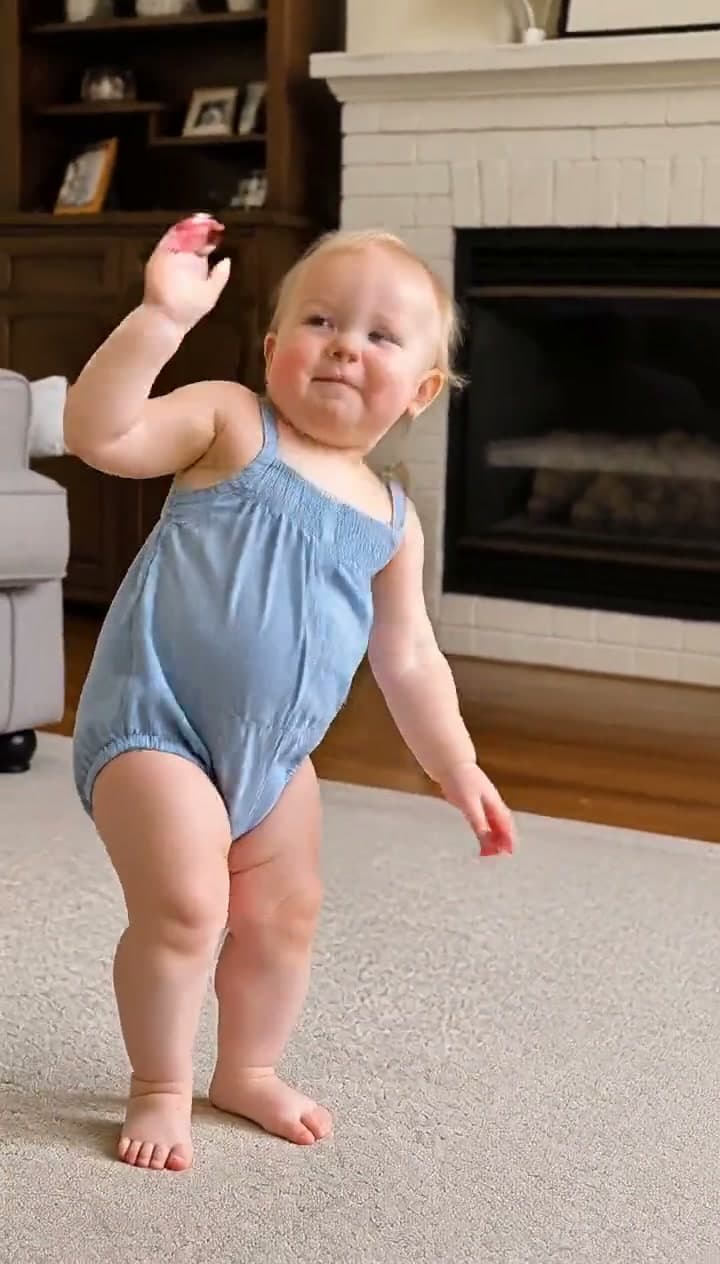
The same dance, any subject — tap one to make it with your photo.
What You're Trying to Make
One photo in, and out comes you — or your baby, or your dog — performing the smooth amapiano routine everyone's feed is full of: the relaxed leg-work, the arm swings, the low-groove drop, all mapped move-for-move from the original viral performance and synced to the track. Your subject dances in your photo's own setting, full body, for the complete 28-second routine.
The song is "Ngifuna Wena (Skin to Skin Remix)" by Weckly Jay — isiZulu for "I want you" — an amapiano hit that owned South African TikTok (the dance challenge has crossed 2 million posts) before football TikTok adopted it as the "Real Madrid AI dance": CapCut's Real Madrid AI templates let fans drop one photo in and come out dancing in Madrid framing, and the format went global. The source of the choreography is the original dancer's clip — white suit, white hat, a crowd cheering him on.
Fastest way — Ngifuna Wena on Starrd does it in one tap: upload a photo and it renders the full performance — your subject, your photo's own background, the real track, every move on the beat. Want the method? Read on. ↓
Is This a Trend? (Yes — Two Trends Stacked on Each Other)
This one is really two waves feeding each other. First, the Ngifuna Wena dance challenge — the amapiano routine from the original dancer's clip, huge on Mzansi TikTok. Then the AI wave: CapCut shipped Real Madrid AI templates on the sound, football fans flooded feeds with AI versions of themselves (and their favorite players) doing the dance, and the format picked up the "Madrid dance trend" name far beyond anyone who'd heard the song before. The spin-offs tell you how big it is — "AI dog dancing amapiano" is its own trending search.
The gap the self-insert fills is the same as every dance trend: most people can't do the routine. AI versions aren't a substitute for the challenge — they're how the majority participates. And the versions that travel are the ones where the subject swap is the joke: the baby with full conviction, the dog on two legs, grandma.
The Fastest Way — Use the Ngifuna Wena Template on Starrd
The Ngifuna Wena template packages the whole thing into a single upload:
- Pick one clear photo. You, your kid, your pet — full-body preferred, decent lighting, one subject.
- Open the template in the Starrd app or web library (Dance category).
- Upload and tap generate. Starrd builds a clean full-body performer that looks like your subject, keeps your photo's setting, and maps the original 28-second performance onto them — vertical 9:16, track included.
Ngifuna Wena
Drop any photo and watch them do the viral Ngifuna Wena dance — the full amapiano routine from the original performance, mapped move-for-move and synced to the track. Works on you, your baby, or your pet. No prompt to write.
The rest of this guide is the DIY route.
Or, Build It Yourself — This Is a Motion-Control Format
Like every dance trend where the versions sync perfectly, this is motion transfer, not text prompting. A fixed driving clip (the original performance) supplies the choreography; a still image supplies the character. You need:
- The driving clip — the original performance.
- A motion-control model — Kling 2.6 Motion Control is the reliable pick; it maps the clip's motion onto your still and carries the audio through.
- A clean upright full-body still of your subject — the make-or-break input. Motion control estimates a skeleton from the image, so the subject must be fully upright, full body, one unobstructed silhouette. Pets get stood up on two legs first.
STILL PREP (run on an image model with your photo as reference): Transform the main subject from the reference photo into a full-body shot of the SAME subject standing tall and fully upright in a relaxed, dance-ready posture — body vertical, weight centered, arms loose and slightly away from the body, ready to move. If the subject is an animal on all fours, rear it up onto its hind legs into a steady bipedal stance. Preserve the subject's exact identity, colors, textures, markings, and distinguishing features — the same individual, only the pose changes. One clear unobstructed silhouette, alone in the frame, full body head-to-feet. Vertical 9:16, photorealistic, even lighting. No text, no logos, no watermarks.MOTION PASS (motion-control model, driving clip + the still above): The subject performs an energetic, rhythmic dance with full-body movement — bouncing, stepping, and swinging the arms to the beat. Confident, fun, playful energy. Smooth natural motion, stable consistent character.
The motion-pass prompt stays short on purpose — with motion control, all the timing comes from the driving clip; the prompt only sets energy and character stability. Spend your effort on the still instead: its framing and silhouette decide whether the skeleton maps cleanly. This routine is full-body with big leg-work, so a cropped or seated reference fails outright.
Common Mistakes That Tank Your Video
- A seated, cropped, or obstructed reference. The skeleton estimate needs one clean full-body silhouette. This dance uses the whole body — waist-up won't cut it.
- Text-prompting the dance. You'll get generic swaying that lands on none of the beats. Use motion transfer.
- A short-haired pet rendered bare. Reared-up animals showing their underside can trip moderation — fluffy breeds and clothed subjects pass far more reliably.
- Swapping the background. Your photo's own setting is what makes your version yours instead of a copy of the original.
- Cutting the routine short. The low-groove drop mid-routine is the moment everyone waits for — keep the full performance.
Related Reading
- How to Make an AI Dance Video — the pillar guide: every named routine in the dance library, same one-photo workflow.
- How to Make Your Pet Dance With AI — the dancing dog/cat cut of the format.
- How to Make the Nun Cagnam Maje AI Video — the other football-TikTok motion-control trend of the month.
- Viral AI Video Trends (2026): The Monthly Roundup — every trend worth making this month.