Quick answer
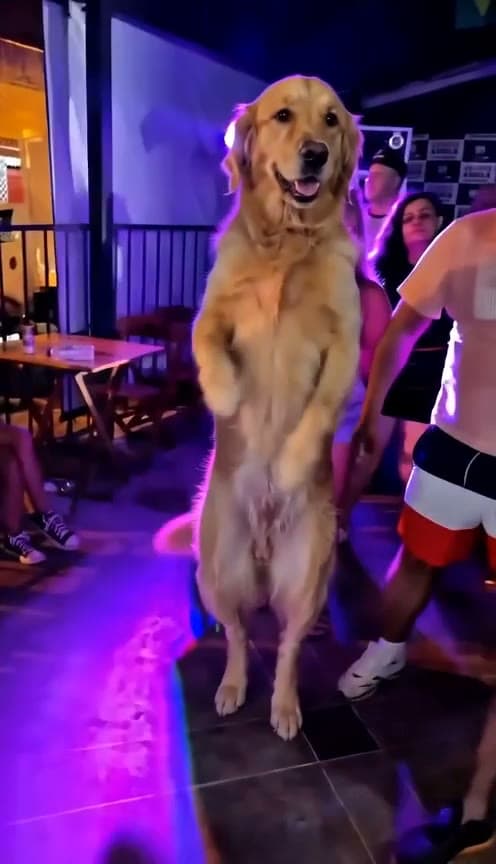
Upload one photo to Starrd's That's My Dawg template and it puts your subject in place of the older man in the black-and-white floral shirt and white shorts in the viral nightclub clip, then copies his dance move for move with Seedance 2.0 — every step, hip sway, arm swing and head bob, with the original audio. It works on people, dogs, cats and babies (pets and babies dance upright like a person), costs 100 credits (about $5), takes one photo, and comes out vertical 9:16 at 10 seconds.
The same dance, any subject — tap one to make it with your photo.
One photo in, and out comes your subject stepping into the That's My Dawg club clip — you, your friend, your dog, your baby — doing the older man's exact dance on the packed floor. Here's exactly what you get:
That's My Dawg
One photo. You, your dog, your baby, anyone, stepping in for the That's My Dawg dance — his exact moves, the original club and audio. No prompt to write.
What the Trend Actually Is
The clip is simple: a phone video from inside a crowded nightclub, where an older man in a black-and-white floral short-sleeve shirt and white shorts owns the dance floor. He's not doing counted choreography — it's steps, hip sways, arm swings and head bobs, with the total confidence of someone who has been dancing like this for decades.
It has been circulating on TikTok as a meme since at least October 2023, with posts captioned "THAT'S MY DAWG!!!!!" — the line you say about the friend who always does this at the function. Most versions are reposted as "original sound" uploads rather than credited to one track, so "that's my dawg" is the search term that finds it, not a song title.
Why it works: everyone has a "that's my dawg" person. Tagging your friend — or putting them in his shirt's spot — is the whole format. And the name does double duty the moment you swap in an actual dog.
Why This Is a Swap, Not a Prompt
You can't describe your way to this video. Ask a model for "an older man dancing in a nightclub" and you get a different man, a different club and a different dance every time. The trend is this clip — this floor, this crowd, these moves.
So the template doesn't generate a club at all. It takes the original video and replaces one person in it, the dancer, with your subject — the rest of the frame stays the real clip.
The Fastest Way
That's My Dawg
One photo, 10 seconds, vertical. Your subject replaces the dancer and does his exact moves on the original dance floor.
One photo, 100 credits, no prompt. The template writes a description of your subject, puts them in the dancer's spot on the first frame, then copies the whole dance onto them with the original audio underneath.
Pets and babies work — and they're the funniest version. The template stands them up on two legs like a person, so your dog does the same arm swings and hip sways at the same height the original dancer does, instead of wagging on all fours.
Build It Yourself
The pipeline is two steps: edit the first frame, then drive it with the original clip.
1. Swap the dancer on the first frame. Take a still from the start of the clip and edit it with GPT Image 2 (image-to-image), using your subject's photo as the second reference. Only the dancer changes — same spot, same size, same pose — and everything else in the frame is left alone:
Image 1 is a photo of the subject. Image 2 is a still frame from a phone video of a crowded nightclub dance floor.Replace ONLY the older man in the black-and-white floral short-sleeve shirt and white shorts in Image 2 with the subject from Image 1: [one-line description of the subject — species or age group, coat or hair, markings, and the clothing they actually wear]. The subject stands in exactly his spot, at the same size and scale, in the same pose: FULLY UPRIGHT and standing tall on two legs, one hand resting on the chest, the other arm relaxed at the side, facing the camera with a proud smile. Even if the subject is an animal or a small child, it stands upright on its hind legs like a person. Full body visible from head to feet.PRESERVE the subject's exact identity from Image 1: face, fur or hair, skin tone, breed, markings and their own clothing (an animal stays unclothed exactly as in its photo). Do NOT dress the subject in the floral shirt or white shorts.Keep EVERYTHING else in Image 2 exactly the same: the same nightclub, blue and purple lights, the crowd, the camera angle, framing, blur and grain. The original man must be completely gone. Photorealistic phone-video look. Vertical 9:16. No text, no watermark.
Check the still before you pay for video. If any trace of the original man is left — a sleeve, a shoe — it will come back in the animation.
2. Copy the dance with Seedance 2.0. Feed the edited frame as @Image1 and the original clip as @Video1 to Seedance 2.0 reference-to-video. The clip supplies every move and the camera; the frame supplies who is doing them:
@Image1 is the first frame. @Video1 is the performance to copy.The subject in @Image1 takes the place of the older man in the black-and-white floral shirt and white shorts in @Video1, and dances EXACTLY like him, motion synced with @Video1 for the whole clip: every step, hip sway, arm and hand movement, head bob and turn he makes, at the same moment.Everyone else in @Video1, including the crowd, stays exactly as in @Video1, moving as they do. The camera moves exactly as in @Video1.The older man in the floral shirt never appears in any frame; the subject from @Image1 replaces him in every frame from the first to the last. Keep the nightclub, the blue and purple lights and the phone-video look from @Image1.
For a pet, add one line: tell the model the animal stays upright on its hind legs for the whole clip and uses its front legs as arms. Without it, a dog tends to drop back onto all fours halfway through.
Model choice: Seedance 2.0, because it takes a video as a reference and copies the motion and camera from it while keeping the first frame's identity. Render at 10 seconds; the audio is the original clip's, laid back on after.
Common Mistakes
Prompting the dance instead of copying it. A described dance is a different dance every render. The clip is the choreography.
Leaving the original dancer in the first frame. Anything of him that survives the edit — a floral sleeve at the edge, a white-shorts leg behind your subject — is what the video model latches onto, and he reappears.
Dressing your subject in his outfit. The joke is your person in his spot. Keep their own clothes (or, for a dog, no clothes).
Letting a pet go four-legged. The moves are arm swings and hip sways. On all fours, a dog has nothing to swing.
Posting it muted. The sound is half the meme. Sound on.
FAQ
How many photos? One.
Does it work on my dog? Yes — it stands your dog up on two legs and gives it the same moves.
Is it my room or the club? The club. This one keeps the original dance floor and swaps only the dancer.
Want a routine in your own room instead? Camden Bop rebuilds your own background from your photo.
Related Reading
- How to Make Your Pet Dance with AI — the pet-dance pillar
- AI Baby Dance Video — the same idea with a baby in the lead
- How to Make the I Got That Feeling AI Dance Video — another one-photo dance, pet-friendly
- How to Make the Camden Bop AI Video — a solo routine in your own room
- How to Make an AI Dance Video — the dance pillar