Quick answer
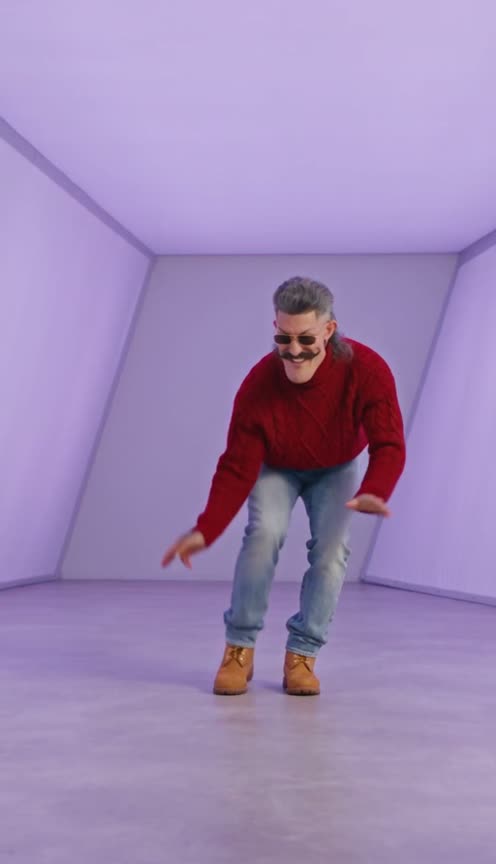
Starrd's Hotline Bling Pt 2 template turns one photo into the second half of Drake's "Hotline Bling" video: five shots in the glowing rooms, every cut on the beat, and a new outfit at every cut. Shot one is the outfit from your photo, lip-syncing "ever since I left the city"; then a navy sweatsuit down a long corridor, a brown leather jacket sitting on the white staircase, an open purple puffer in the light box and a red cable-knit turtleneck for the laughing shuffle. It works with pets too. 1 photo, 17 seconds, vertical 9:16, 480p, Seedance 2.5, 200 credits (about $10).
The same dance, any subject — tap one to make it with your photo.
Part two. Five rooms, five outfits, one photo, and you open it by singing the first line of Drake's "Hotline Bling":
Hotline Bling Pt 2
One photo. Sing the first line, then dance down the corridor, sit on the staircase and do the laughing shuffle, in a new outfit at every cut. 17 seconds.
What You Get
- 17 seconds of the video, from "ever since I left the city" through the beat to the laughing shuffle.
- Five shots, every cut where the original cuts.
- A new outfit at every cut. Shot 1 is what you wear in your photo, then four new looks.
- A lip-synced first line, close to the camera.
- The glowing rooms. Hot pink, a long corridor that shifts blue to green to lilac, a white staircase, a light box that turns from blue to yellow, and a lilac room.
- Your own face and hair in every shot.
- People or pets.
- Vertical 9:16, with the audio, ready for TikTok, Reels and Shorts.
What the Video Actually Is
It's from Drake's "Hotline Bling" video (2015, directed by Director X), the one with Drake alone in bare rooms that glow one colour at a time. Our first template, Hotline Bling, covers the light-box dance.
This one comes from a TikTok edit posted on November 12, 2026 with the caption "you ever just #drake". It hit 1.2 million plays and 400,000 likes in its first day. It opens on Drake in the red puffer singing "ever since I left the city", then cuts to the instrumental: Drake dancing at the far end of a glowing corridor, sitting on a long white staircase rubbing his hands, bouncing in a light box, and doing the knee-bend shuffle while trying not to laugh.
Why it suits AI: the whole joke is the rooms and the outfits. Nobody has a glowing corridor, a white staircase and four jackets on hand. One photo covers all of it.
The 17 Seconds, Shot by Shot
| Time | Room | Your outfit | What happens |
|---|---|---|---|
| 0.0s | Hot pink, close-up | The outfit from your photo | You sing "ever since I left the city", one fist bobbing at your chest |
| 1.6s | Long corridor, blue to green to lilac | Navy crewneck sweatsuit, white sneakers | Dancing on the spot at the far end |
| 5.3s | White staircase, pink to blue | Brown leather biker jacket over a cream hoodie | Sitting on a step, rubbing your hands, a sly smile |
| 8.6s | Light box, blue turning yellow | Open purple puffer over a white tee | Bouncing side to side inside the glowing box |
| 12.2s | Lilac, teal, green, purple | Red cable-knit turtleneck, light jeans, tan boots | The knee-bend shuffle with a big laughing grin |
Your Look
Shot 1 is exactly what you wear in your photo. After that the clothes change at every cut, but your face, hair, facial hair and glasses stay the same. The new looks have no logos or lettering. A director's note can change the first outfit; the other four stay, because the outfit run is the template.
Pick a photo where your face is clear and you can see your whole outfit. Shot 1 is a close-up, so your face matters most there.
The Fastest Way
Hotline Bling Pt 2
You in part two of Hotline Bling: five glowing rooms, five outfits, one sung line. One photo, 17 seconds.
One photo, 200 credits (about $10), no prompt. Vertical 9:16, 480p, 17 seconds, with the audio. Find it in Dance, right next to part one.
Build It Yourself
1. Start from the clip. Take the first 17 seconds and note the four cuts (1.6, 5.3, 8.6 and 12.2 seconds). That's where the outfits change. The light box changes colour at 10 seconds, but that's lighting, not a cut.
2. Make one reference sheet with every outfit. One image, one band per outfit, each band a 360-degree turnaround of you, keeps your face the same while the clothes change.
Image 1 is a photo of one person. Make a photoreal vertical character reference sheet of five horizontal bands separated by thin black lines, each band four full-length views of the person from Image 1 (front, three-quarter, side, back) in a bare glowing room. Band 1, hot pink room: the outfit from their photo. Band 2, blue room: a navy crewneck sweatshirt, navy sweatpants, white sneakers. Band 3, white room with a lilac glow: a brown leather biker jacket over a cream hoodie, black jeans, black boots. Band 4, yellow room: an open glossy purple puffer over a white T-shirt, light jeans, tan work boots. Band 5, lilac room: a chunky red cable-knit turtleneck, light jeans, tan work boots. Same face and hair in every band, no logos, no text.
3. Drive a video model with the clip. Feed the sheet, your photo and the clip to a model that copies motion from a reference video. Starrd's Character Swap works on your own clip. Say which band each shot uses, and give the exact cut times.
Common Mistakes
Letting the first shot run long. Without exact cut times, the model can stay in the pink room and squeeze the corridor and staircase. Give every cut as a time.
Asking for lip-sync the whole way. Only the first line has words. If you ask for singing throughout, the mouth moves over an instrumental and looks wrong.
Losing accessories at the cuts. Glasses, chains or a watch from your photo can vanish when the outfit changes. Say that they stay on in every shot.
Related Reading
- How to Make the Drake 'Hotline Bling' AI Video: part one, the light-box dance in seven outfits
- How to Make the 'Toosie Slide' AI Video: another Drake dance, from one photo
- How to Make the 'Look Alive' AI Video: Drake and BlocBoy JB's video, with a friend
- How to Make the Kakalika Dance AI Video: a one-take dance in very wide baggy pants
- How to Put Yourself in Any Video With AI: character swap on your own clip
- Viral AI Video Trends 2026: every trend we've turned into a template this year